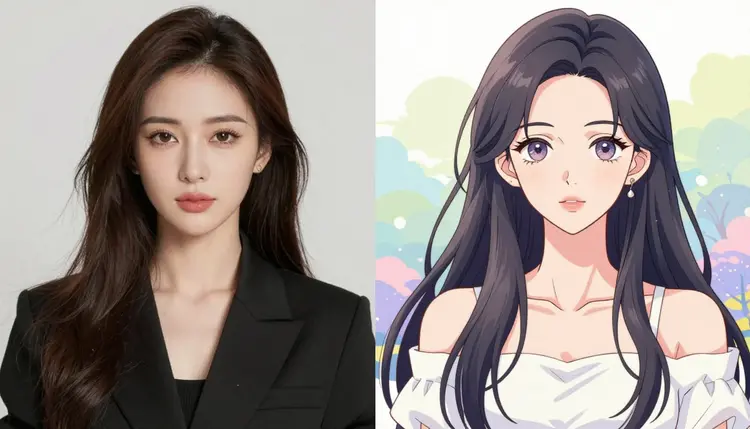
Turning a photoreal adult image into an anime or illustrated look is an editing job, not a generation job. You already have the pose, the framing, and the composition you want. What changes is the rendering style: skin becomes cel shaded, lines get cleaner, colors get flatter and more saturated, and the whole image reads as drawn rather than photographed. Picasso Image Editor Pro is built for exactly this kind of instruction based edit, and it is one of six models in the catalog confirmed to generate adult content directly, without a safety filter blocking the request.
This page is for adults only. Every restyle described here assumes a fictional subject, whether that is a character you invented, a stylized self portrait, or artwork you have the rights to edit. Picasso IA does not support real people's likeness, public figures, or anything resembling a minor, in any style, photoreal or anime. That rule holds regardless of which model you use or how the prompt is worded.
Restyling to anime is one of the more forgiving edits to get right, because you are asking the model to change texture and rendering, not to invent new content, move limbs, or add objects that were not there. The source image already carries the pose and composition, so the model's job is narrower, and the results tend to be more consistent than a full recreation from a text prompt alone.
Picasso Image Editor Pro is an image editor, not a from scratch generator. You give it two things: an existing image and a plain language instruction describing the change you want, and it returns a new version of that image with the instruction applied. The rest of the image, everything you did not ask it to change, is meant to stay close to the original: same subject, same pose, same framing, same background layout.
That distinction matters for a restyle request. A text to image model like Seedream 4.5, Qwen Image 2, or Recraft V4.1 Pro can generate an original anime style adult image from a written description, and all three are also confirmed to do so without a safety filter. But if you already have a specific photo and want to keep its exact pose and composition, an editor is the right tool: you are not describing a new scene, you are asking for the same scene rendered differently.
Picasso Image Editor Pro is confirmed filter free for adult prompts, so a restyle instruction that includes explicit adult content is not the reason a request would fail here. The catalog holds 488 models in total, and only six of them, including this one, are confirmed to handle adult prompts directly. Every other model may apply its own content filter and decline a flagged instruction outright.
- Upload your source photo. Start from the photoreal image whose pose and composition you want to keep. A clear, well lit photo with the subject fully in frame gives the model the most to work with.
- Open Picasso Image Editor Pro. Go to Picasso Image Editor Pro and attach the uploaded photo as the input image for the edit.
- Write a plain restyle instruction. Describe the target look directly, for example asking for a cel shaded anime style with clean linework and flat colors, and state that the pose, framing, and composition should stay the same.
- Generate and review the result. Run the edit and check that the anime rendering matches what you asked for and that the pose and composition held. Editors work from a single instruction, so results can vary between runs.
- Refine with a follow up edit. If the linework, shading, or color palette needs adjusting, submit another instruction targeting just that detail rather than starting over from the original photo.
The clearer the instruction, the more predictable the result. A few things that tend to help.
Name the anime look you want instead of just saying "anime style." Cel shading, flat colors, thick outlines, soft cel shading, or a specific line weight all describe different results, and Picasso Image Editor Pro will follow whichever one you spell out.
Say what should stay the same. Adding a line like "keep the pose, framing, and background layout unchanged" gives the editor a clear boundary between what to touch and what to leave alone.
Separate style from content. If you also want a change to lighting, background, or clothing at the same time as the anime conversion, it usually works better as its own instruction, run either before or after the restyle, rather than folded into one long request.
Keep source images clean. A photo with clear separation between subject and background restyles more predictably than a busy or cluttered one, since the model has to figure out where the edit boundary is.
Treat each generation as a draft. Editors do not produce a pixel perfect result on the first try every time, and a short follow up instruction is usually faster than rewriting the whole prompt from scratch.
Adult content on Picasso IA is limited to fictional subjects. That means no real person's likeness, no public figure, and nothing resembling a minor, in any style or rendering, anime included. This applies to every model in the catalog, not just the six confirmed filter free ones, and it is not a setting you can turn off.
Beyond that hard rule, most models in the catalog apply their own content filter and will decline a prompt they flag as adult content. When that happens, the app shows a message that the content is not supported by that model, and it recommends switching to one of the six confirmed models, carrying your prompt over automatically so you do not have to retype it. Seedream 4.5, Qwen Image 2, Recraft V4.1 Pro, Picasso Image Editor Pro, Picasso Video, and LTX 2.3 Pro are the six.
The honest move when a model refuses a prompt is to switch to one of those six, not to reword or disguise the request to sneak past a filter. That approach does not work reliably, and it is not what this app is built around. If you are restyling with a model that is not on that list, whether Nano Banana, Seedance, Sora, Veo, Kling, GPT Image 1, DALL-E 3, or any other name in the full catalog, assume it will apply its own filter to adult prompts unless you have confirmed otherwise.
New accounts on Picasso IA start with free credits, which is enough to try an edit like this before deciding whether to subscribe. Every generation, including an edit through Picasso Image Editor Pro, draws from your credit balance, and the exact cost depends on the plan and model. Full plan details, including what each tier includes, live on the pricing page.
If you plan to restyle images regularly, it is worth trying the workflow with your free credits first: upload a photo, run a restyle instruction, and see how many follow up edits you typically need to land the look you want. That gives you a realistic sense of usage before committing to a plan. Beyond single edits, the toolkit groups Picasso Image Editor Pro alongside other editing and generation tools if you want to combine a restyle with other changes in one place, and the full catalog lists every model available if you want to compare options beyond the six confirmed filter free ones.
Can Picasso Image Editor Pro turn a real photo into anime style while keeping the same pose?
Yes. Picasso Image Editor Pro is an editor, so it starts from your uploaded photo and applies the style change you describe while aiming to keep the pose, framing, and composition intact, since those were not part of the instruction.
Is Picasso Image Editor Pro one of the models confirmed to generate NSFW content without a filter?
Yes. It is one of six models in the catalog confirmed to handle adult prompts directly: Picasso Image Editor Pro, Seedream 4.5, Qwen Image 2, Recraft V4.1 Pro, Picasso Video, and LTX 2.3 Pro.
Does this work with real people's photos?
No. Picasso IA does not support real people's likeness or public figures in any style, including anime, and it never supports anything resembling a minor. Restyling is limited to fictional subjects.
What happens if I try this restyle on a model other than the six confirmed ones?
Most other models apply their own content filter and will decline a flagged adult prompt. When that happens, the app shows a message that the content is not supported by that model and suggests switching to one of the six confirmed models, carrying your prompt over so you do not lose it.
Can I reword my prompt to get a filtered model to accept an adult restyle?
That is not a reliable approach, and it is not how the app is meant to be used. If a model declines your prompt, the straightforward path is switching to one of the six confirmed filter free models rather than trying to disguise the request.
Do I need to describe the anime style in detail, or is "anime style" enough?
A general term like "anime style" will work, but naming specifics, such as cel shading, flat colors, or line weight, gives you more predictable and repeatable results, since the editor follows whatever level of detail you give it.
Can I change the background or lighting at the same time as the anime restyle?
You can, but it often works better as a separate instruction. Asking Picasso Image Editor Pro to change one thing at a time, style first and then background or lighting, tends to produce cleaner results than combining several changes into a single request.
How many of the 488 models in the catalog support NSFW content?
Six. The catalog has 488 models total, and only six are confirmed to generate or edit adult content without applying a safety filter: Picasso Image Editor Pro, Seedream 4.5, Qwen Image 2, Recraft V4.1 Pro, Picasso Video, and LTX 2.3 Pro.
Is there a free way to try this before paying for a plan?
Yes. New accounts start with free credits, which cover trying a restyle edit before you decide on a plan. Details on what each paid tier includes are on the pricing page.
Where can I find Picasso Image Editor Pro and other editing tools in the app?
Picasso Image Editor Pro is linked directly from this page, and it also appears alongside other editing and generation tools in the toolkit. If you want to compare it against other options, the full catalog lists every model available.