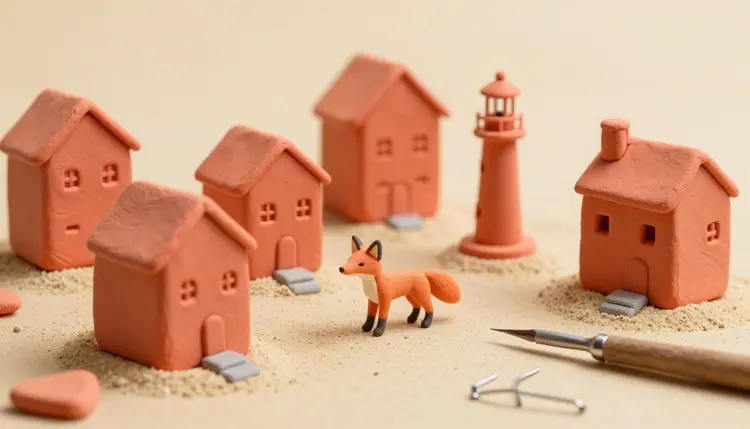
Claymation has a look that is hard to mistake: soft thumbprints in the surface, chunky shapes, a little wobble in the movement, and a world that feels small enough to hold. A real clay film takes weeks of nudging figures a hair at a time. A video model can give you the look in a few minutes from a written description, and it is surprisingly good at the texture, though less good at the rhythm. This page shows how to prompt for it and where it stops.
Clay animation is one of the most charming styles in film and one of the slowest to produce. Every second of footage is a pile of tiny physical adjustments, plus sets, lighting and armatures. That cost is why most people who love the style never make anything in it. A text-to-video model removes the sculpting and the camera rig, so the question changes from can I afford to build this to what do I want to see.
The style also happens to suit the technology. Clay worlds are simple: one or two characters, a handful of props, a tabletop, warm light. Models cope with simple scenes better than with crowded ones. A short clay clip works as a title card, a social post, a kids' story beat, a product mascot moment or a music visual, and it is forgiving of small imperfections because handmade work is supposed to look slightly imperfect.
Picasso IA puts 121 text-to-video models and 212 text-to-image models in one workspace, the toolkit, so you can build the still in one model and animate it in another without leaving. New accounts get free credits to try it, and the pricing page covers what generation costs afterward.
Models recognize clay from a small vocabulary of material cues. Name the material and the evidence of handwork, and the output moves from generic cartoon to something that feels sculpted. Describe the physical set too, because the style depends on the miniature world around the character as much as on the character.
Words that tend to help, in rough order of impact: plasticine or modeling clay, visible fingerprints and thumbprints, slightly lumpy hand-sculpted surfaces, matte clay with soft highlights, a miniature tabletop set, shallow depth of field like a macro lens, warm practical studio lighting, felt, cardboard and painted wood props. Give the character simple geometry, such as a round body, bead eyes and a stubby nose, because real clay figures are built from simple shapes and models imitate that.
Describe motion in clay terms as well. A character that bounces, squashes on landing and stretches on takeoff reads as animated clay. A character that glides smoothly like a 3D render reads as CGI, even with a perfect clay surface. If your first result looks too slick, say so in the prompt: slightly jerky hand-animated movement, small imperfections, no motion blur.
There is more than one way to get to a clay clip, and they trade control against effort. Here is how the main routes compare on the models in the catalog.
| Approach | What you give the model | Best for | Watch for |
|---|
| Text only | A prompt with the clay vocabulary | Quick tests of the look | The character changes between runs |
| Still first, then animate | An image from an image model plus a motion prompt | A look you have already approved | The video may smooth the clay texture |
| First and last frame | Two stills, such as pose A and pose B | A defined action with a clear start and end | The in-between motion can ignore clay physics |
| Reference images | Several stills of one character | Keeping a mascot the same across shots | Needs clean, consistent source images |
| Multi-shot script | A shot list in one generation | A short story with a few scenes | Shots still need a matching look |
For most people the second row is the sweet spot. Models such as nano-banana-pro, flux-2-pro and seedream-5-pro make the stills. For the video, kling-v3-video takes a start image, an optional end image and a multi-shot script of up to 6 scenes. seedance-2.5 accepts up to 30 reference images and can run to 30 seconds. veo-3.1 takes a start and end frame and up to 3 reference images, with clips of 4, 6 or 8 seconds.
This is the route that gives you the most control, and it works the same way for a mascot, a short story beat or a product moment.
- Design the character as a still. Open the toolkit, pick an image model such as nano-banana-pro or flux-2-pro, and describe a plasticine character on a miniature set with visible thumbprints. Generate four and keep the one that looks most hand-made.
- Fix the set and the light. Edit the still until the background, the props and the warm tabletop lighting are right. Changing the still is cheaper than changing the video, so settle the look here.
- Animate it with a video model. Attach the still as the start image in kling-v3-video, seedance-2.5 or veo-3.1 and write one simple action in clay terms: bounces twice, squashes on landing, slightly jerky hand-animated movement.
- Try a second model on the same still. The three models move differently, so a run in each tells you which one keeps the clay surface and which one smooths it out. Compare them side by side before choosing.
- Cut it together and add sound. Join the best clips in your editor, add music or narration, and use a sound effects workflow if your clip came out silent.
Tip: ask for movement a little worse than you want. Real stop-motion has a slight stutter and tiny imperfections between frames, and a prompt that says slightly jerky, hand-animated, no motion blur pulls the output away from smooth CGI and closer to the handmade feel.
Most disappointing clay clips fail for the same few reasons, and all of them are fixable in the prompt.
Writing claymation and nothing else is the first one. The word alone often produces a smooth cartoon with a vague clay hint. Add the material words, the thumbprints and the miniature set. The second is overloading the scene: five characters, a crowd and a moving camera is where clay surfaces melt into a generic render. Keep to one or two figures and a slow or fixed camera.
A third mistake is asking for a long, complicated action in one clip. Models hold a clay texture best during short, simple movements, and a character that does a flip, a dance and a conversation tends to lose its shape. Break the action into separate clips and join them. The fourth is changing the character description between generations, which gives you a different creature each time. Keep one approved still and reuse it, as covered in the page on consistent AI characters.
Last, people skip the sound. Clay animation leans on small squishes, footsteps and music for its charm, and a silent clip feels half finished. Plan for audio before you publish.
The look transfers well. The process does not, and it is worth knowing where the gap is before you plan a project around it.
- Stepped frame rate: real stop-motion is often shot on twos, so the picture changes every other frame and the movement has a visible stutter. Video models generate smooth motion, so you can only approximate that stutter with prompt wording, and results vary clip to clip.
- Texture drift: thumbprints and surface lumps can shift or smooth out as a character moves, which is the opposite of physical clay, where the surface stays put between frames.
- Clay physics: real clay holds its volume. Models sometimes let a figure stretch, merge with a prop or change size mid-shot in ways sculpted material never would.
- Character continuity: across several clips the face, the proportions and the color can slip unless you start every clip from the same approved still.
- Length and control: you cannot nudge one finger between frames. You get a clip, not a set of poses, so precise performance, lip movement on a specific line and exact timing are mostly out of your hands.
If you need true frame-by-frame control, a physical rig or a dedicated stop-motion tool is still the answer. AI is the faster route to the look, not a substitute for the craft.
Can AI really make claymation videos?
It can make videos that look like claymation: clay surfaces, a miniature set, a hand-sculpted character. What it does not do is shoot physical frames, so the movement is generated rather than posed. For short clips, mascots and story beats the result is convincing at normal viewing speed, and a few minutes of testing will show you how well your idea survives the style.
Which AI model is best for claymation videos?
There is no single best, and that is the point of having a catalog. Kling v3 Video offers multi-shot scripting and start and end frames, Seedance 2.5 handles reference images and longer clips, and Veo 3.1 is a strong option for short clips with sound. A sensible session runs the same still through two of them and keeps the one that holds the clay texture best.
Should I start from a text prompt or from an image?
An image gives you more control. Generate a still with an image model such as nano-banana-pro or flux-2-pro, approve the look, then use it as the start image for the video. Text-only prompts are fine for quick experiments, but the character tends to change from run to run, which makes a series of clips harder to keep consistent.
How do I make the clay look more convincing?
Name the material and the evidence of handwork: plasticine, visible thumbprints, lumpy hand-sculpted surfaces, a miniature tabletop set, warm studio light, shallow depth of field. Keep character shapes simple and the camera slow. If the motion looks too smooth, add slightly jerky, hand-animated movement and no motion blur to the prompt, and test again.
Can I get the real stop-motion stutter?
Only partly. Real stop-motion changes pose in discrete steps, often every other frame, while video models generate fluid motion. Prompts that ask for jerky, hand-animated movement can push the result toward that feel, but the effect is inconsistent. If you need exact stepped timing, you can also drop frames in your editor afterward to imitate it.
Can I animate my own clay figure or a photo of a sculpture?
Yes, if the figure is yours or you have the right to use it. Upload a photo as the start image in a model such as kling-v3-video or veo-3.1 and describe the movement. A photo of a real sculpted figure often carries authentic texture, which the video model then tries to preserve. Do not use a photo of a real identifiable person.
How long can an AI claymation clip be?
It depends on the model. Kling v3 Video produces clips of up to 15 seconds, Veo 3.1 offers 4, 6 or 8 seconds, and Seedance 2.5 can run to 30 seconds. Longer is not always better for this style, since clay texture and character shape hold best in short, simple actions. Most projects join several short clips instead of one long one.
Can I keep the same clay character across multiple clips?
Yes, with some care. Start every clip from the same approved still, or feed a model such as seedance-2.5 several reference images of the character. Keep the prompt wording for the character identical between runs. Small drift in color or proportion can still appear, so check each clip against the original before joining them in your edit.
Is it okay to use these videos commercially?
Rules differ by model and by country, and they keep changing, so check the terms for the model you use and any platform you publish on. Use only your own characters or fictional ones, and avoid copying a famous clay character or studio style too closely. For client work, keep the prompt and the approved stills as a record of how the piece was made.
How much does an AI claymation video cost?
Generations are paid in credits, and the cost depends on the model, the duration and the settings you pick, so any number written here would be out of date soon. Stills cost less than video, which is another reason to settle the look in an image first. New accounts get free credits, and the pricing page has current plans.
Ready to try the look on your own character? Open the Picasso IA toolkit, generate a clay still and see how far a prompt gets it.