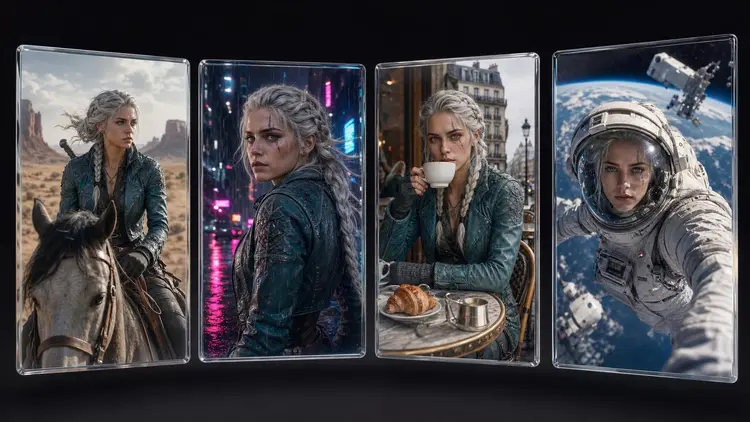
Anyone who has tried to make a comic with AI knows the moment: panel one looks perfect, panel two stars a stranger. Same prompt, same settings, different face. Image generators sample fresh noise on every run, so identity does not carry over on its own. Reference image models fixed that. Hand the model a picture of your character and it holds the face steady while you change the scene, the outfit or the style around it.
A text prompt describes a category, not an individual. Write "a woman in her thirties with copper hair, green eyes and a scar over her left eyebrow" and you have narrowed the model down to a few million plausible faces. Every generation samples one of them, and readers notice within two panels that the heroine keeps getting recast.
Locking the seed does not solve it. A fixed seed reproduces the same image under the same settings; change the pose or one word of the prompt and the face shifts too. Seeds give you repetition, not identity. For years the real answer was training a LoRA on twenty images of your character, which demanded a dataset of someone who did not exist yet, plus training time most authors and marketers reasonably declined.
Reference inputs collapsed all of that into one upload. Instead of describing your character and hoping, you show her, and the model renders the same person in a new situation. It is the difference between telling a sketch artist about your friend and handing over a photograph.
Picasso IA hosts 488 models, and a growing group accept reference images as a first-class input. They behave differently enough to be worth choosing deliberately; the full catalog is on the models page.
| Model | Reference input | Where it fits |
|---|
| nano-banana-2 | One or several reference images | Fast scene and outfit changes that keep the face intact |
| seedream-4.5 | Multiple reference images | High detail renders, outfit swaps, 4K output |
| flux-kontext-pro | One image plus an edit instruction | Surgical edits that leave everything else untouched |
| ideogram-character | A character reference portrait | Purpose-built consistency from one photo |
| multi-image-kontext-pro | Two reference images | Putting your character next to a second subject |
The nano banana family, Google's image editing line, is the everyday workhorse: it follows instructions like "same woman, now in a rain-soaked alley at night" and returns her, not a cousin. Seedream, from ByteDance, takes several references at once and shines when a render needs fine detail or an outfit carried over exactly. FLUX Kontext treats your image as context for a targeted edit, right when only one garment or the lighting should change.
None of these requires training anything. Upload, prompt, generate. The skill that matters now is reference management, which is where the character sheet comes in.
Animation studios do not draw a character straight into a scene. They draw a model sheet first: front, side and back views, a neutral expression, a few emotional extremes, the standard costume. Every artist on the production draws against the sheet. The AI workflow that actually holds together copies this exactly.
Your sheet needs a clean neutral portrait, a three-quarter view, a full-body shot with the default outfit, and two or three expressions. Generate the first portrait with any strong text-to-image model, iterating until the face is one you can commit to for fifty panels, then use it as the reference for the rest.
Pro tip: write an identity block, a short fixed paragraph naming the character and their invariant features (hair, eyes, marks, outfit, palette), and paste it into every prompt beside the reference image. The image anchors the face; the text anchors what the reference cannot show. Keep it in a notes file, never retyped from memory.
The sheet costs an evening and pays for itself the first time you need your character seen from behind. A model asked to invent an unseen angle will guess; a model handed a turnaround does not have to.
The workflow below runs in the Picasso IA toolkit and takes an afternoon the first time. New accounts include free credits, enough for a first sheet and test scenes.
- Design the master reference. Generate portraits until one face is worth keeping, and save the best frontal shot at full resolution. This image becomes the ancestor of every future generation.
- Write the identity block. Fix the invariants in a short reusable paragraph: name, age, hair, eyes, marks, default outfit, palette. This text travels with the reference into every prompt.
- Expand into a character sheet. Feed the master portrait to a reference model and request the missing views: three-quarter, profile, full body, key expressions. Keep only outputs where identity truly held.
- Generate scenes against the sheet. For each panel, attach the most relevant sheet image, paste the identity block, then describe only the new scene. Change one variable at a time: outfit, or pose, or setting.
- Audit and promote. Line up outputs side by side every few batches and reject drift early. When a scene render beats the sheet, promote it into the sheet and reference it going forward.
The one-variable rule in step four is what separates a stable character from a slow slide into a stranger.
Comics, Mascots, Storyboards: Where Consistency Pays
Comic creators are the obvious case, because a comic is nothing but the same faces in new panels. With a sheet per main character, page production becomes a loop of reference plus panel description. Authors illustrating a book work the same way: one sheet per protagonist, and the child on page forty is recognizably the child from the cover.
For marketers the character is a mascot, and the stakes are brand equity. A mascot that subtly morphs between the newsletter and the social campaign reads as sloppy before anyone can say why. A locked sheet turns the mascot into an asset any teammate can deploy: same otter, new seasonal scene, every quarter. The interface ships in six languages, so a distributed team can share one workspace and one sheet.
Game designers get two payoffs: concept iterations stay anchored while costume explorations run wide, and a finished render can move into image to 3D conversion to become a rough model for blocking or printing. Storyboard artists get a third: render the cast across every frame, animate key frames with an image-to-video model like Kling, and lay narration over the cut with an AI voiceover. Weighing this catalog approach against a single-model tool? The Midjourney comparison covers where each wins.
Reference models moved character work from impossible to reliable, not to perfect. Knowing the failure modes in advance saves credits.
- Fine details drift: freckle patterns, jewelry, tattoo linework and clothing logos rarely survive a generation exactly. Put identity in strong features, not small ornaments, or plan to fix details by hand.
- Extreme angles wobble: a face referenced from the front can come back subtly off in a low-angle or rear shot. Wider sheet coverage shrinks this; nothing eliminates it.
- Style changes bend identity: pushing a photoreal character into watercolor or anime re-renders the geometry. Build a separate sheet per art style you intend to keep.
- Two characters compound the error: each identity in a scene competes for the model's attention. Compose important group shots from fewer elements, or use a two-reference model.
- Every render needs review: consistency is probabilistic, and some generations miss. Budget a reject rate into your credits; see pricing if a project outgrows the free allowance.
None of these is a reason to go back to recasting your hero every panel. They are the boundaries of a tool that, used inside them, holds up.
Which AI model is best for consistent characters?
There is no single winner, which is why a multi-model catalog helps. The nano banana models are the everyday choice for fast edits that preserve identity, Seedream leads on multiple references and high resolution, FLUX Kontext is strongest for precise edits, and ideogram-character was built for holding one face across scenes. Run the same sheet through two or three and keep the best fit.
Can I keep the same character in different outfits and poses?
Yes, that is the core use of reference inputs. The reference image carries the face and build while the prompt describes the new outfit, pose or setting. The reliable pattern is one variable per generation: swap the outfit against a neutral pose first, then use that output as the reference for dynamic poses. Changing everything in one jump gives the model three excuses to renegotiate the face at once.
How many reference images should I use?
Start with one clean, well-lit portrait and add more only when the model supports it and the shot demands it. Models like Seedream accept several references, useful when you need the face from one image and an outfit from another. More is not automatically better, since conflicting references pull the output toward an average. A curated set that truly looks like one person beats a folder of near misses.
Does this work for a comic with dozens of panels?
Yes, long-form comics are where sheet discipline pays off most. Keep one master sheet per character, generate panels in batches organized by scene so lighting stays coherent, and paste the same identity block into every prompt. Expect to reject some panels and regenerate; that is cheaper than fixing drift in post. On long projects, refresh the sheet every few chapters with the best recent renders.
Can I keep a character consistent in AI video too?
The dependable route is stills first, motion second. Generate a consistent keyframe with your reference workflow, then feed it to an image-to-video model such as Kling, which animates from the image you give it. Identity holds best over short clips of a few seconds; long continuous shots accumulate drift. Storyboard the sequence as stills, animate each beat separately, and cut the clips together.
Do I still need to train a LoRA for character consistency?
For most projects, no. Reference image models deliver the consistency that used to require training, with no dataset and no setup. Training still makes sense when one character must appear across thousands of assets with tight fidelity. If you already have trained LoRA weights, the catalog includes flux-dev-lora to run them, but the sensible default is references first, training only if results fall short.
Can I use a photo of a real person as the reference?
The models will accept any face, which is precisely why you should be careful. Use photos of yourself freely, and photos of anyone else only with their clear consent. Publishing generated images of identifiable real people without permission can violate personality and privacy rights. For fiction the cleaner path is a fully generated face: it belongs to no one.
Why does the face change when I switch art styles?
A style is not a filter laid over a fixed drawing; the model re-renders the whole image in the new visual language, and a jawline reads differently in flat anime shading than in photorealism. Some translation loss is unavoidable. Keep the identity block in the prompt, accept the stylized version as an interpretation, and build a small sheet inside the new style for later renders to reference.
How much does building a character sheet cost?
A sheet is a modest number of generations: a batch of candidate portraits, a handful of turnaround and expression shots, plus rejects. Each generation costs credits that vary by model and settings, and new accounts include free credits, enough to build a first sheet before paying anything. For ongoing production, check the current plans; the sheet is a one-time cost that every later scene amortizes.
Can I use my consistent character commercially?
Generally yes; comics, book illustrations, mascots and marketing assets are what this workflow exists for. Do the diligence a human-drawn mascot would need: check the license terms of the models you generate with, verify the character does not copy a protected design, and consider a trademark if it will represent a brand. Review every image before it ships, and disclose AI generation where required.
Your character already has a face; the question is whether it survives the next generation. Open the Picasso IA toolkit, upload your reference, and see how far one portrait can travel.