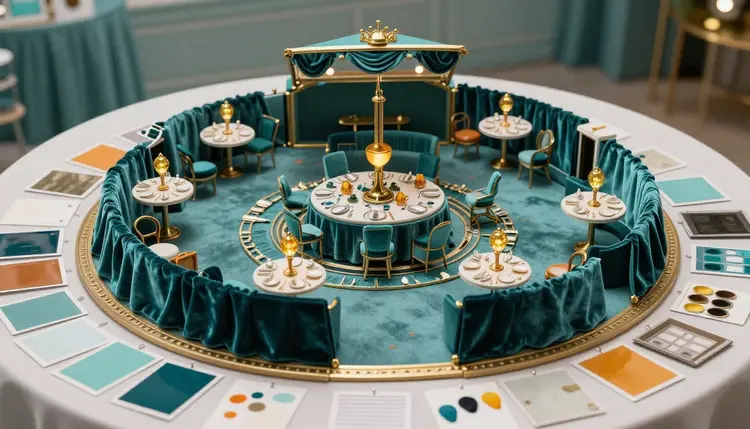
A client who cannot picture the room will not sign for it, and a venue deposit is a hard way to find out that the picture in your head and the one in theirs do not match. An AI mood board closes that gap before the booking. You describe the look, or edit a photo of the space, and show the client a handful of images of the finished evening to react to, so the argument about colors happens on screen and not at the venue.
Event planning runs on a sequence of commitments, and the earliest ones are the most expensive to reverse. A venue gets booked, a florist gets a brief, a rental company holds the linens. If the client only understands the plan once the first invoice has been paid, every disagreement after that costs money. A mood board moves the disagreement to the start, where it is free.
Traditional boards are collages of swatches and other people's events. They communicate a taste, but they do not show this client's event in this kind of room. Text-to-image models change that, because a brief such as a long banquet table, emerald velvet chairs, warm amber candles, a dark paneled hall is exactly the input they handle well. You get an image of the thing you described, not a near miss from a stock library.
Picasso IA runs 502 models behind one workspace, 212 of them in the text-to-image category, so you can try the same brief on engines with different strengths and keep the one that reads the client's taste best. The full catalog is open to browse, and new accounts get free credits to see whether the approach suits your clients before you spend anything. For an agency or a freelance planner the practical gain is simple: a pitch can include the look of the evening, not only the budget and the date.
A board does not have to be one kind of image. The strongest ones mix a few, because each answers a different question the client is silently asking. The table below separates them, along with the thing to double-check in each.
| Approach | Where it helps most | What to double-check |
|---|
| Text-to-image room concept | Early pitch, before any venue is chosen | Layout, capacity and ceiling height are invented by the model |
| Edit a venue photo | Showing a shortlisted space in your palette | Windows, columns and fixtures can shift or vanish |
| Table and centerpiece close-ups | Florals, linens, place settings | A supplier may not be able to make exactly what the image shows |
| Lighting and time-of-day variants | Comparing a daylight reception with an evening one | The venue's real lighting rig and power limits decide what is possible |
| Palette and material studies | Agreeing on colors, fabrics and finishes | Screen colors will not match printed or dyed fabric |
| Entrance and arrival moments | The first impression guests get | Any signage text in the image must be redone in a real design tool |
Most planners end up with five to nine images per board: one wide room view, two or three table and detail shots, one lighting alternative, and one palette study. Fewer than that and the client has little to react to. More than that and the board turns into a catalog they cannot decide from.
This is the sequence that ends with a board you can put in front of a client, rather than a folder of images with no story. It works the same for a wedding, a launch party or a corporate dinner.
- Write the brief and list the fixed facts. Event type, mood in three or four adjectives, two or three colors, and what the client has already ruled out. Add the facts that cannot change, such as indoor or outdoor and rough guest count, so the images do not drift away from them.
- Generate three directions with a text-to-image model. Try FLUX 2 Pro, Seedream 4.5 or Imagen 4 on the same brief and keep the palette fixed. Make a wide room view for each direction so the client compares atmospheres, not details.
- Edit a photo of a shortlisted venue. Upload a photo you are allowed to use, then ask nano banana or Flux Kontext Pro to change the linens, the chairs, the lighting or the color of the walls, one change at a time.
- Add the detail images and assemble the board. Generate the table close-up, the centerpiece and the lighting alternative from the winning direction, then place everything in a slide or a PDF with short captions that call them concepts.
- Review with the client, then hand off with real numbers. Note which images they loved and which they rejected, then send the venue and suppliers the measurements, capacity and constraints. The board sets the look; the floor plan and the quotes set what is built.
Everything above runs in the Picasso IA toolkit: pick a model, write the prompt or attach the photo, generate, and compare the results side by side.
A good event prompt names the room, the furniture, the materials, the light and the mood, in roughly that order. A line like a long banquet table in a paneled hall, emerald velvet chairs, brass candlesticks, warm evening light from tall windows, photographed from the end of the room gives the model a camera position and a physical setting. Vague prompts such as elegant party produce the average of every party the model has seen, which is exactly the generic look clients already dislike.
When you edit a venue photo, the rule is one change per instruction. Ask for the tablecloths to be deep teal, check the result, then ask for the lighting to feel warmer. Editors such as nano banana accept one or several reference images with a plain sentence, so you can also attach a photo of a fabric swatch or a flower arrangement and say to use it as the reference for the table. Flux Kontext Pro is built for the same kind of text instruction, and it can keep the framing of the original photo, which matters when the client needs to recognize their own shortlisted room.
Honesty is the other half of the craft. Keep the architecture of the real room intact: do not let an edit raise the ceiling, widen the room or add a window that is not there. If the venue is cramped, an image that makes it look grand is not a mood board, it is a misleading brochure, and the complaint arrives on the day of the event. The interior design workflow and the virtual staging page use the same edit-the-photo technique and are worth reading for how to keep an edited room recognizable.
Caption every image as a concept and say which parts are real. A line such as venue photo with proposed linens and lighting, concept only, protects both of you: the client knows the room is the real one, and nobody expects the exact chairs in the picture.
Once the client picks a direction, keep its reference image so later images match the first one.
A board is a picture of an intention. It cannot do the work that follows it, and the planner who treats it as more than that will be caught out. These are the specific places it stops helping:
- Dimensions and capacity: a model has no idea how many tables a hall holds, and it will happily draw a room twice as spacious as the real one. Measure the venue, and use a proper floor plan tool for seating and flow.
- Rooms it has never seen: an edit of a venue photo keeps the general shape of the space but can drop a pillar, move a door or flatten a ceiling. Compare the result against the original before the client sees it.
- Exact products and fabrics: the image shows a velvet chair that looks right, and no supplier is obliged to own it. Match the board to what the rental company or florist has in stock before promising anything.
- Text and logos: names, menus and signage come out garbled often enough that you should leave them off and add them in a design tool. Use a client's logo only with their permission.
- Lighting and sound reality: a glowing amber evening in the image still needs the venue's actual lighting, its power and its curfew. Ask the venue what can be hung, plugged in or lit.
None of this is a reason to skip the board. It is the reason the board comes first and the contract comes second, with the real measurements in between.
Can AI show how my event would look in a specific venue?
Partly. You can upload a photo of the venue and ask an editing model such as nano banana or Flux Kontext Pro to change the linens, chairs, lighting or wall color, which gives the client a believable idea of the look in that room. The model is working from one photo, so it does not know the full layout, the ceiling height or what is outside the frame. Treat the result as a mood, and confirm anything physical with the venue.
Which AI models work best for event mood boards?
It depends on the job, which is the case for a catalog. For room concepts and table scenes from a written brief, text-to-image models such as FLUX 2 Pro, Seedream 4.5 and Imagen 4 are good starting points. For edits to a venue photo, nano banana and Flux Kontext Pro take plain-language instructions with a reference image. Run the same brief through two or three models and follow the one that reads your client's taste best.
Am I allowed to edit a photo of a venue I do not own?
For an internal concept shown to your own client, using a photo from the venue's public listing or one you took yourself is common practice, but the rules differ by venue and by country. If the board will be published, sent widely or used in marketing, ask the venue first and check the terms on the photo. A planner who works with a venue regularly can often get the originals and permission in one email.
Can I use it to plan the floor plan or seating chart?
No, and it is better to say so plainly. An image model draws something that looks like a room with tables, but it does not count seats, measure aisles or respect fire exits. Use the board to agree on the look, then work out layout on a floor plan with the real dimensions of the space, the real table sizes and the venue's capacity rules.
Will the venue and suppliers be able to recreate what the board shows?
Sometimes closely, often only in spirit. Florists, rental companies and lighting teams work with what they own and what the budget allows. Share the board as a reference for color, mood and style, then ask each supplier what they can deliver in that direction.
How many images does an event mood board need?
Five to nine is a workable range: one wide room view per direction, a few table and detail shots, a lighting alternative and a palette study. If the client is torn between two directions, show only those two and add detail to each instead of a third.
Should I tell clients the images are AI generated?
Yes, and it costs nothing. Label the board as concept visuals created with AI, and say which images come from a real venue photo and which are invented scenes. It also prevents a client from expecting an exact chandelier that only exists in the image. If a client or platform has its own disclosure rules, follow them.
Can I add the client's logo or names to the images?
You can try, but text inside generated images is unreliable, so letters often come out warped or wrong. A better route is to generate the scene without text and add names, logos and signage afterward in a design tool or slide software. Use a brand's logo only with permission, and never place a real, identifiable person into a scene without their consent.
Is there a free way to try this?
New Picasso IA accounts get free credits, which is enough to build a first board and see whether the style suits your clients. Past that, generations cost credits, and the cost depends on the model and the settings you choose. Plans change, so check the pricing page for the current numbers instead of trusting a figure written here.
Can I turn the board into a client presentation or an invitation?
Yes. Export the images and drop them into your slide deck with short captions, which is the usual format for a pitch; the presentation images page covers how to make visuals that sit well in slides. If the event goes ahead, the same palette and style can carry over to an invitation, as described in the wedding invitations workflow, so the guests see the same look as the client approved.
Your next client pitch can show the room instead of describing it. Open the Picasso IA toolkit and build the first board from your next brief.