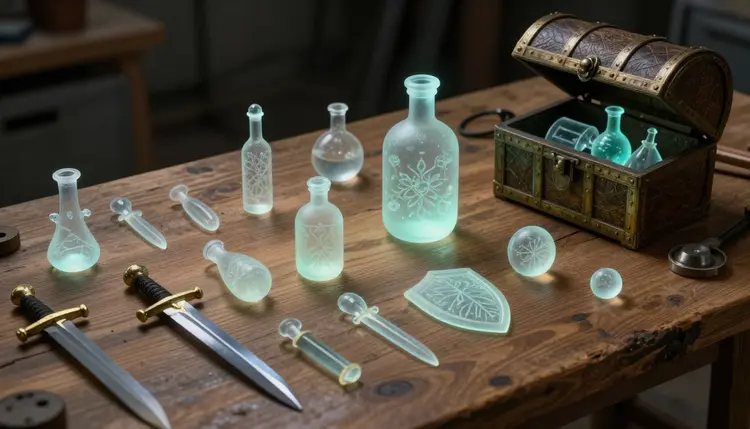
A game with fifty polished icons in fifty different styles reads as unfinished, no matter how good any single icon is on its own. Visual consistency, not any one great asset, is what actually sells a game world as real. AI image generation can fill an inventory grid, a tileset and a dialogue box with hundreds of assets in an afternoon, but only if style is treated as a rule to enforce, not a happy accident.
A solo developer without a dedicated artist runs into a specific trap: it is easy to generate one gorgeous sword icon, then a different gorgeous potion icon in a slightly different rendering style, then a third that resembles neither. Each one might impress on its own. Placed together in the same inventory grid, they clash, and that clash reads to a player as "unfinished" or "asset flip" faster than almost any other visual signal in a game.
The fix is not better prompting on each asset, it is treating the whole set as one production run built against a single written style description, pasted into every generation whether that happens today or six weeks from now. Holding one style across dozens or hundreds of assets is the actual skill here, a production discipline rather than an art skill, the difference between a game that looks handmade and one that looks assembled from leftovers.
On Picasso IA that means picking one text-to-image model and one style description, then reusing both for icons, tiles, portraits and interface chrome alike. Switching models mid-project is the most common way an otherwise good-looking asset set falls apart. The Toolkit is where generation happens, with the full list in the catalog to compare a few before settling on one.
Most 2D games, whatever the genre, draw from the same four recurring categories, and each carries a different technical constraint that changes how you prompt for it and what to check once it comes back.
| Asset Type | Technical Consideration |
|---|
| Item icon | needs a transparent background and a fixed square canvas so it drops cleanly into a UI grid |
| Environment tile | must tile seamlessly at the edges, which generation alone rarely achieves on its own |
| Character portrait | needs consistent framing and expression range across every character in the cast |
| Interface element | has to read clearly at small sizes, so fine detail has to survive being shrunk to icon scale |
| Prop for a 3D scene | benefits from several angle references before it gets converted into a 3D asset |
Icons and portraits are usually where a small team starts, because a working inventory and a handful of dialogue faces make a prototype feel real fastest. Tiles and interface chrome tend to come later, once a level or menu layout is settled enough to know what needs texturing. Props for 3D scene dressing are their own case: a flat generated image is a starting point, and the image to 3D workflow turns a convincing 2D concept into a rotatable model.
The single highest-leverage thing a solo developer can do before generating a single asset is write one paragraph describing the art style precisely enough to paste, unchanged, into every generation for the rest of the project. That paragraph should fix the art style itself (hand-painted, pixel art, flat vector, painterly fantasy), the color palette, the line weight, and the lighting treatment, and should not name the specific object being generated, since that part changes every time.
The reason to write this down rather than improvise it each session is memory. A style held in your head while generating the first ten icons will not survive perfectly to icon eighty, especially with weeks between sessions. A written description does not drift, so pasting identical wording keeps an asset made in week one visually married to one made in week six.
Pro tip: keep the style guide under a hundred words, and put the fixed instructions first, art style, palette, line weight, lighting, with the specific request last, a health potion, a portrait of the blacksmith. The parts you never want to change belong at the front, so you can reuse the same block for asset one and asset two hundred without hunting for what to edit.
Item icons are the easiest category to get right, because the ask is narrow: one object, centered, on a background you intend to strip out. Generating against a plain backdrop, rather than a busy scene, makes transparency cleanup far faster, and asking explicitly for "no background, no shadow" reduces how much editing that pass needs.
Environment tiles are the hardest category, because a tile only works if its left edge continues believably into the next tile's right edge, and a single generated image has no built-in awareness of that constraint. Generate a candidate texture larger than you need, then plan on cropping and edge-blending afterward rather than expecting a seamless tile on the first try.
Character portraits carry their own difficulty: a cast of six needs six portraits that feel like they belong in the same game, with matching rendering and a comparable expression range. This is close enough to a different problem, keeping one face consistent across images, that the dedicated workflow on consistent AI characters is worth reading before generating a full cast.
Interface chrome, buttons, borders, health bar frames, is easy to underrate. These assets sit at small sizes constantly, so generate them large and check them shrunk to their in-game size, since detail that reads fine at full resolution can turn to mush at forty pixels wide.
An honest page tells you where the tool stops helping. Five limits show up on nearly every asset set, and knowing them in advance saves a production schedule that treats generation alone as the finish line.
- Seamless tiling is not automatic: a texture that looks continuous in preview will usually show a visible seam once tiled, so budget a manual edge-blending pass before it goes into a tileset.
- Transparency needs cleanup: generated backgrounds rarely come back perfectly clean, and a sprite editor pass to fix stray pixels is standard, not optional, before an icon is production-ready.
- Exact pixel dimensions are not guaranteed: models generate at their own native resolutions, so hitting an exact sixty-four or one-twenty-eight pixel canvas usually means resizing and cropping afterward.
- Character consistency has a ceiling: even with a careful style guide, a cast rendered across many separate sessions will drift slightly, so a final visual pass to catch outliers before shipping is worth the time.
- Copyright checking is on you: check any generated asset against existing games in your genre before shipping commercially, since a model trained on a huge image corpus can occasionally land close to something that already exists.
None of these limits change what the tool is good for, filling a game with a large, stylistically coherent asset set fast; they define where generation ends and cleanup begins.
The order you generate in matters almost as much as what you generate. Working category by category against one fixed style guide, rather than jumping between icon, tile and portrait requests, keeps the visual thread intact from the first asset to the last.
- Write the style guide first. One paragraph, art style, palette, line weight, lighting, written before you generate anything, becomes the block you paste into every session.
- Generate the category you need most first. Item icons for a working inventory, or portraits for a dialogue scene, whichever makes the prototype feel real fastest, so early testing has something honest to react to.
- Check new assets against the ones you already have. Place a fresh icon next to earlier ones before moving on, and if the palette has drifted, adjust the style guide wording and regenerate.
- Clean up transparency and exact dimensions in a sprite editor. Strip stray background pixels, crop to the canvas size your engine expects, and resize precisely.
- Build out the remaining categories against the same style guide. Move on to tiles, portraits or interface chrome only once the first category is solid, reusing the identical style paragraph.
Can AI actually generate game-ready assets, or just concept art?
It can generate production-usable assets, with a cleanup pass. A generated icon, tile or portrait is a finished-looking image, but it typically still needs transparency cleanup and an exact resize to your engine's dimensions. Treat the output as a strong first draft rather than a final export, and budget a short editing pass per category before it enters the build.
How do I keep dozens of assets visually consistent?
Write one style guide paragraph, fixing the art style, palette, line weight and lighting, and paste it unchanged into every generation for the project. The consistency comes from reusing identical wording, not from remembering the style in your head, which is why a description written on day one and pasted verbatim on day sixty is the most reliable technique available.
Which model should I use for pixel art versus painted styles?
Different text-to-image models lean toward different rendering treatments, so it is worth testing the same prompt against two or three models before committing to one. Once you find a model that renders your chosen style well, stay with it for every asset, since switching mid-project is one of the fastest ways to introduce visible inconsistency.
Can I get a truly seamless tiling texture straight out of generation?
Rarely on the first try. Generation is good at producing a texture that looks continuous and convincing as a single image, but the exact pixel match a seam-free tile needs usually requires cropping and manual edge-blending afterward. Treat the generated texture as raw material for a tileable asset, not the tileable asset itself.
Do I need to remove backgrounds manually after generating an icon?
Usually yes, at least a light pass. Asking the model explicitly for a plain background with no shadow produces an easier starting point, but the edges still tend to need cleanup in a sprite editor before the transparency is production quality. Generating against a solid backdrop rather than a busy scene cuts this cleanup time considerably.
How many reference images does a consistent character portrait set need?
There is no fixed number, but generating three or four variations early and picking the one that best matches your style guide as an anchor reference works better than generating one portrait and hoping it holds up. Apply that same anchoring approach to each character individually rather than trying to lock the whole cast at once.
Can generated 2D concepts become 3D props for a scene?
Yes. A convincing flat image of a prop, a crate, a lantern, a weapon, is a strong starting point for the image to 3D workflow, which converts a 2D concept into a rotatable model. Generating a couple of angle variations first tends to give a cleaner result than converting from a single view.
Is it safe to use AI-generated assets in a commercial game?
Check each asset against existing games in your genre before shipping, since a model trained on a large image corpus can occasionally land close to an existing design, especially for well-known tropes. This is a normal part of asset production, not a reason to avoid generation, but a step worth building into your process.
Will hundreds of assets cost a lot of credits to generate?
Costs scale with how many images you generate and which model you use, and you can check exact figures on the pricing page before committing to a large batch. New accounts get free credits to test the workflow on a handful of assets, usually enough to confirm a style guide and model choice before generating at full volume.
What is the biggest mistake indie developers make with AI game art?
Generating everything before checking anything. It is tempting to batch-generate a hundred icons and sort out consistency later, but style drift compounds silently, and by asset eighty the palette can have wandered from asset one. Check new output against existing assets every ten to twenty generations to catch drift while it is still cheap to fix.
A style guide paragraph and a handful of free credits are enough to find out whether this workflow fits your project. Try it against your game's palette in the Toolkit before committing to a full asset list.