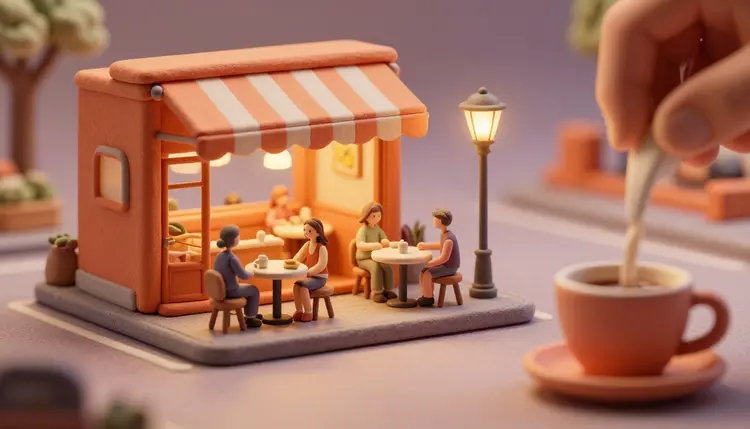
A video of a tiny cafe, with figures the size of a thumbnail and cups the size of a grain of rice, stops people mid-scroll for a simple reason: the brain tries to work out the scale and cannot let go of it. You can now build that kind of scene from a written prompt, with no model kit, macro lens or tilt-shift rig, and then turn the still into a short moving clip.
Miniature footage has always been a trick of perception. Real photographers shoot a full-size street from above with a tilt lens, blur the top and bottom of the frame, and boost the saturation, and suddenly cars look like toys. Model makers go the other way and build a real small set, then light it like a film. Both routes are slow.
Image models skip the physical set. They have seen enormous numbers of toy photos, dioramas, clay figures and macro shots, so a prompt that names the right visual cues gets you something that reads as small. Video models then add the part that makes people watch twice: a steam wisp over a tiny cup, a slow push-in on a tiny shopfront, a tiny figure turning to look at something off-frame.
On Picasso IA the whole chain lives in one place. You build the scene with an image model, move it with a video model, and the toolkit keeps both steps next to each other. New accounts get free credits, so you can test whether a scene idea survives the jump from still to video before you commit more to it.
A miniature is not defined by what is in the frame. It is defined by a handful of cues that tell the eye the camera is very close to something very small. If you write those cues into the prompt, the model has something concrete to aim at, instead of guessing what tiny means.
The first cue is shallow depth of field. In real macro work only a thin slice of the scene is sharp, so the foreground and the background melt into soft color. Ask for a tilt-shift look, a blurred foreground, and a sharp focus on the tiny subject. The second cue is a comparison object: a coffee bean as big as a person's head, a fingertip entering the frame, a spoon, a coin, a matchstick. Anything with a known size makes the scale legible. The third is material: clay, felt, painted plastic or wood, with visible fingerprints and slightly uneven edges, tell the viewer this is a handmade model and not a real street.
Light does the rest. Small practical lights, such as a tiny street lamp glowing warm or a window lit from inside, imply a close macro lens and a model set. A top-down, slightly high camera angle, as if you were looking over a table, adds the classic tilt-shift feel. For ideas on ready-made looks, the effects page holds preset styles that are worth skimming before you write a prompt from scratch.
Not every miniature subject is equally easy. Some scenes give the model a lot of structure to lean on, others invite the kind of small errors that break the spell. This table compares five common angles, with the cue that carries each one and the risk to watch.
| Scene | Scale cue that carries it | Best motion to ask for | Main risk |
|---|
| Tiny cafe with a few figures | A giant cup or fingertip beside the shopfront | Slow push-in, steam rising | Figures merge or change count |
| Desk-sized harbor or village | Visible clay or painted texture, a top-down angle | Gentle pan across the rooftops | Buildings shift between frames |
| Tiny people on a food item | A fork, crumb or sesame seed for comparison | Static camera, one small action | Hands holding tools look wrong |
| Garden or terrarium world | Dewdrops and leaves much bigger than the figures | Light drifting across the scene | Plants morph while moving |
| Toy train or tram line | A chunky track and painted scenery | Camera follows the vehicle | Track geometry drifts |
A good habit is to treat the first row as your practice scene. A tiny cafe has enough structure to look convincing, and it forgives small mistakes in the background because the shallow depth of field blurs them. Once that works, move to a scene with more motion.
The reliable order is still first, motion second. A video model that starts from a good image has far less room to invent the wrong scale, and the turn photos into videos page covers the general version of this move.
- Write the scene as a model, not a place. Name the material and the camera first: a handmade clay model of a tiny cafe, tilt-shift photography, shallow depth of field, a giant coffee cup in the foreground for scale. Then add the figures and the light.
- Generate a batch of stills. Run the prompt through an image model such as Seedream or nano banana, four variants at a time, and keep the one where the scale reads in half a second. Throw away any frame where figures are fused or the count looks odd.
- Fix the details with an edit. Use an editing model to change one thing at a time, such as the awning color, the number of figures or the size of the cup, instead of rewriting the whole prompt and losing the composition you liked.
- Animate the winner. Open a video model such as Kling v3 Video or Veo 3.1 in the toolkit, attach the still as the first frame, and ask for one small motion: steam rising, a camera push-in, a figure lifting a cup.
- Review at full speed, then trim. Watch the clip at normal speed, because errors hide in slow motion and show up at play speed. If the scale slips, regenerate with a shorter duration or a simpler motion instead of stacking more instructions.
Most failed miniature clips fail in the same few ways, and nearly all of them come from the prompt, not from the model. The usual culprit is describing a place instead of a model. A prompt like a busy cafe on a street gets you a normal cafe. A prompt like a handmade diorama of a cafe, photographed from above with a tilt lens, gets you something that looks like a toy.
The second mistake is asking for too much motion. A tiny world is charming because it is calm. When you ask for a crowd rushing, cars racing and a camera spinning, the model has to keep dozens of small objects consistent, and the scale falls apart first. One slow camera move and one small action is a better brief than five things at once.
Keep one comparison object in frame. A fingertip, a spoon or a coin tells the viewer the size in a way no adjective can, and a video model holds it better than a vague word like tiny.
The third mistake is skipping the still. Going straight from text to video means the model has to settle composition, scale, material and motion in one pass. Splitting it into a still and then a move gives you a checkpoint where you can reject a bad scale for the cost of one image.
Be honest about what the current models do badly, so you can design around it instead of fighting it. The scenes that work best are small, calm and mostly static in the background. The cases below are the ones that regularly break.
- Scale consistency: during a camera move the model can quietly enlarge a figure or a building, so the cafe slowly stops looking tiny. Short clips and slow moves keep this under control.
- Hands and small tools: tiny people holding forks, cups or tools often get extra fingers or fused objects, and at miniature scale the viewer looks straight at the hands. Frame the figures so the hands stay small or hidden.
- Figure counts: three tiny customers can become four by the end of the clip. If the count matters, keep the group small and re-check the last frame.
- Fictional characters only: build tiny people as invented characters. Do not shrink a real, identifiable person into a diorama, and use a likeness only if it is your own.
- Long continuous shots: a clip that runs for many seconds drifts more than a short one. For a longer piece, plan several short shots and edit them together.
None of this makes the format unusable. The best miniature world videos are short, deliberate and built around a single idea.
How do I make AI tiny people videos that look real?
Start with a still image that already reads as small, then animate it. Write the material, the camera and a comparison object into the prompt, for example a clay model, tilt-shift look, shallow depth of field and a giant cup beside the figures. Then give a video model that still as its first frame and ask for one slow motion. Real here means convincing scale, and the cues do most of that work.
Which models are good for miniature scenes?
For stills, image models such as Seedream and nano banana are worth testing side by side with the same prompt. For motion, Kling v3 Video and Veo 3.1 both accept a starting image and a text description, so you can animate a still you already like. Picasso IA lists 212 text-to-image and 121 text-to-video models, so the practical approach is to run one prompt through two or three and keep the one that holds the scale.
What is the tilt-shift effect and do I need it?
Tilt-shift is a camera technique that blurs part of a frame so a full-size scene looks like a model. You do not need the lens, because the effect is a visual pattern a prompt can request: shallow depth of field, a high angle and a sharp band of focus. You can also skip the word tilt-shift and ask for macro photography of a handmade diorama, which often gives a cleaner look.
Can I animate a photo of a real place into a miniature?
Yes, an image-to-video model can start from a photo you own, and an editing model can restyle it as a toy-like diorama first. The result is a stylized impression, not a faithful model of the place, so details will change. Use your own photos or ones you have the right to edit, and avoid putting recognizable people from the photo into the miniature.
How long can a miniature world video be?
It depends on the model and the settings. Kling v3 Video produces clips up to 15 seconds and Veo 3.1 offers 4, 6 or 8 seconds. Short is usually better for this format, because scale and figure counts drift more as the clip gets longer. For something longer, make several short clips of the same still from different camera moves and cut them together.
Why do my tiny characters change size or number?
Video models do not track objects the way a human does, so small figures are the first thing to wobble when the camera moves. Reduce the number of figures, ask for a slower camera, keep the clip short and begin from a clean still. If one frame still goes wrong, regenerate with the same still and a simpler motion instead of adding more instructions to a prompt that is already crowded.
Can I add sound to a tiny cafe scene?
Some video models can generate audio with the picture. Veo 3.1 has an audio option that is on by default, and Kling v3 Video can generate native audio when you enable it. For a cafe, ask in the prompt for soft ambient sounds like a quiet room tone and cups, and keep expectations modest. You can also add music or effects afterward, and the toolkit has models for both.
Can I use real people or celebrities as the tiny characters?
No. Keep the characters fictional. A real, identifiable person should not be turned into a miniature figure without their clear permission, and a celebrity likeness is a bad idea for legal and ethical reasons. If you want a human face, use your own, or design an invented character and keep that reference consistent with the approach in consistent AI characters.
Can I use these videos commercially, for example in ads?
That depends on the platform where you publish and on the terms of the model, so check the current requirements of the platform and the rules that apply in your country before running anything as an ad. A miniature scene of invented characters is the safer kind of content, because it contains no real person or brand. For product-specific ideas, the page on product demo videos is a useful companion.
How much does it cost to make a miniature world video?
Generation is paid in credits, and the cost depends on the model and the settings you choose, such as duration and resolution. An image costs less than a video, which is one more reason to settle the still before you animate it. New accounts get free credits to start, and the current plans are listed on the pricing page, which is the only place worth trusting for numbers.
Your tiny cafe is one prompt away from a first frame. Open the Picasso IA toolkit, build the still and see how the scale holds once it moves.