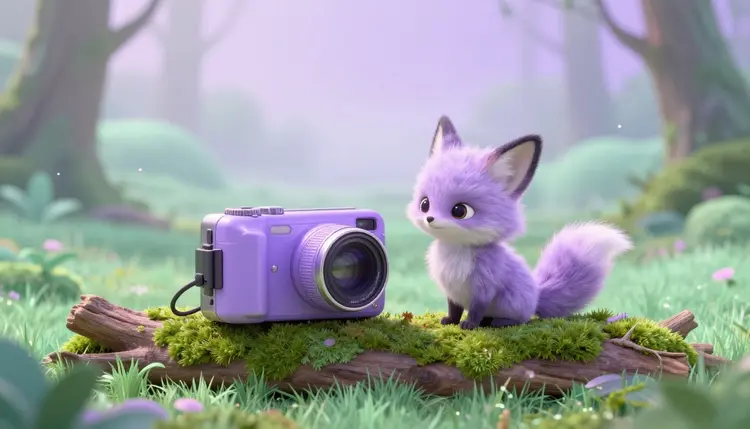
Picture a small purple fox holding a camera at arm's length, whispering that today is the day it finally finds the good berries. Nobody filmed that, and no such fox exists. An AI animal vlog is a short, first-person style video where a fictional creature films and narrates its own day, built from a character reference, a video model and a few lines of script. This page covers how to make one that holds together.
Vlogs run on a person with a point of view, a place and a small story: where I am, what is going wrong, what I found. A creature carries all three just as well, and it removes the parts that are hard to fake. You do not need a real animal to hit its mark, you do not need a camera operator, and nobody has to agree to be on screen. What you keep is the part audiences actually follow, a recognizable character having a day.
AI video suits the format for a practical reason: vlog clips are short. A few seconds of a creature walking through grass with the camera bobbing, a few seconds of it talking to the lens, a cut to what it found. Each clip is a small request that current video models can handle, and you stitch the clips into a story in whatever editor you already use.
Picasso IA runs 502 models behind one workspace, 121 of them text-to-video, so you can try the same scene on more than one engine. New accounts get free credits, and generation costs credits that vary with the model and the settings, so the pricing page is the place to check numbers. Everything below happens in the toolkit.
The make-or-break problem with a vlog series is identity. If the fox has a white chest in clip one and a grey one in clip three, viewers stop believing in it. The fix is to stop describing the creature in words every time and start showing the model the same pictures every time.
Start with a character sheet: generate a few images of your creature with an image model such as nano banana or FLUX, front view, side view, one expressive close-up, all on a plain background. Decide the details that must never drift, such as ear shape, fur pattern, a scarf or a backpack, and write them down. The same reference-image technique is covered in depth on the page about consistent AI characters.
Then feed those images to a reference-to-video model. Wan 2.7 R2V (wan-video/wan-2.7-r2v) takes reference images or short clips plus a prompt and anchors the subject to them, and it lets you pick shot type, aspect ratio, resolution and a seed. Reusing the same references and the same seed across clips is the closest thing to a continuity department you get here. If the creature is based on your own pet, the pet portraits page shows how to start from your own photos.
Different vlog moments ask for different tools. This table is a starting point, not a ranking, and the best way to settle it is to run one shot on two models and compare.
| Shot you need | Start with | Why it fits | Watch out for |
|---|
| Creature talking to the camera | Seedance 2.5 (bytedance/seedance-2.5) | Renders dialogue, effects and music with the picture, and lip movement follows lines written in quotes | Keep spoken lines short so mouth movement stays believable |
| Same character in many scenes | Wan 2.7 R2V (wan-video/wan-2.7-r2v) | Anchors the subject to your reference images or clips across clips | A thin or inconsistent reference gives a drifting character |
| Animating one hero still | Wan 2.7 I2V (wan-video/wan-2.7-i2v) | Starts from an image you already approved, so the opening frame is exact | The scene has to grow from that one frame, so plan the action around it |
| Scenery and b-roll without the character | Wan 2.7 T2V (wan-video/wan-2.7-t2v) | Gets you forest, river or kitchen cutaways from a text prompt | The character is not anchored, so keep it out of frame |
| Clip that starts and ends on exact frames | Seedance 2.5 first and last frame | Lets you lock how a clip opens and closes for cleaner cuts | Frame-locked modes limit which other inputs you can combine |
If you would rather record your own voiceover, a text-to-speech model from the catalog (24 of them) or your own microphone works too, and the voiceover page walks through it.
This is the workflow that ends with a short episode, not a folder of unrelated clips. It assumes an idea for a creature and a rough plan for a day.
- Design the creature and save the reference images. Generate a character sheet with an image model in the toolkit, pick the three or four best frames, and write down the details that must not change.
- Write a six-beat script. One line per clip: wake up, set out, a problem, a discovery, a reaction to the camera, a sign-off. A planning pass like the one on the storyboards page keeps the beats short.
- Generate the talking clips. Open Seedance 2.5, attach your references, and put the creature's lines in quotes so the dialogue and mouth movement render together with the sound.
- Generate the in-between shots. Use Wan 2.7 R2V with the same references and seed for walking, eating and reacting, and Wan 2.7 T2V for scenery cutaways.
- Cut, label and post. Trim clips in your editor, add a title card if you like, and say clearly that the video is AI generated, following the current requirements of the platform you post to.
The vlog look comes from camera behavior more than from the creature. Ask for a handheld, slightly wobbly framing, a wide-angle lens close to the face, natural daylight, and a creature that glances at the lens now and then. Name the place and the small action: a capybara on a mossy riverbank holding the camera, squinting at the sun, saying that this is the best spot yet.
Keep each clip to one action and one line of speech. Models do better with a single simple beat than with a paragraph of events, and it gives you clean places to cut. Write the negative prompt too when the model supports it: extra limbs, a second creature, on-screen text and a changing outfit are the usual intruders.
Treat the first clip as a test of the character, not of the story. If the creature looks right and sounds right in one five-second shot, every later clip can borrow the same references and wording. If it does not, fix the references before you generate anything else.
Common mistakes are easy to predict. Describing the creature differently in every prompt, packing three actions into one clip, asking for long speeches, and skipping the review of audio before you cut. Watch every clip with sound on, because a mouth that drifts out of sync is more noticeable than a slightly soft background.
A vlog is intimate, and the technology has edges that show up exactly there. Five places to plan around:
- Long continuous takes: models generate clips of seconds, not minutes, so a vlog is always a sequence of cuts, and anything that needs one unbroken walk-and-talk has to be faked with editing.
- Fine detail on small accessories: a scarf, a backpack strap or a tiny name tag can change between clips even with references, so keep the creature's costume simple.
- Multiple characters talking: two creatures in conversation can swap voices or share one mouth, so shoot each speaker in its own clip and cut between them.
- Realistic wildlife behavior: the creature is a character, not a documentary subject, and the videos should never be presented as footage of real animals.
- Precise voices and accents: generated speech sounds like a voice, not a specific one, so choose a character voice you like early and keep it for the whole series.
None of this rules out a good series. It means the format favors short, cut-heavy episodes with one clear joke or discovery per video.
Can I make an AI animal vlog for free?
New Picasso IA accounts get free credits, which is enough to test a character and generate a few clips to see whether the idea works. After that, each generation costs credits, and the amount depends on the model, the duration and the resolution you choose. Video costs more than images, so it pays to settle the character with cheap image tests first. Current plan details are on the pricing page.
Which model is best for a talking animal vlog?
Seedance 2.5 is built for the talking shots because it generates dialogue, sound effects and music together with the video, and lip movement follows lines you put in quotes. Wan 2.7 R2V is the better pick for keeping the creature identical across many non-speaking clips, since it works from reference images or clips. Many vlogs use both, one for speech and one for movement.
How do I keep the same animal looking identical in every clip?
Use the same reference images and, where the model supports it, the same seed. Describe fixed details such as fur color, ear shape and accessories the same way each time, and keep the costume simple. Wan 2.7 R2V and Seedance 2.5 both accept reference images for this. Even then, review every clip before you cut, because small drift in markings can appear.
Can I use a photo of my own pet as the star?
Yes, as long as the photo is yours. Reference-based models can use it to keep your pet recognizable across clips, and a pet who talks to the camera is a popular twist. Be aware that the animation is invented: the model guesses movements and expressions your pet never made, so it works best when you present it as a playful fictional version, not as real behavior.
Does the creature really talk and move its mouth?
With Seedance 2.5, yes. Write the line inside double quotes in the prompt, and the model renders speech with matching mouth movement and generates the sound in the same pass. Short, simple sentences work best. A long monologue tends to wander, so split it across several clips and cut them together. Not every model on the platform generates audio, so check before you rely on it.
How long can a vlog clip be?
It depends on the model. Seedance 2.5 can generate clips up to about 30 seconds according to its model page, while Wan 2.7 R2V lets you set the duration at generation time, with five seconds as its default. In practice most vlog shots are only a few seconds, and you assemble a longer video by editing clips together, which also gives a natural vlog rhythm.
Is it okay to post these videos on YouTube or TikTok?
Fictional creature content is generally fine to post, but each platform has its own rules about AI generated or altered content, including labels and disclosure. Check the current requirements of the platform before you publish, and describe the video honestly as AI generated. Never present a generated clip as real footage of a real animal, and never use the likeness of a real person.
Can I put a real person in the vlog next to the animal?
The page and the workflow are built around fictional creatures, and that is the safe default. If a person appears at all, it should be you, using your own photos, or a fully fictional character. Do not use references of another real, identifiable person without their clear permission, and do not generate someone to say things they never said.
What aspect ratio should I use for animal vlogs?
Vertical 9:16 is the usual choice for short-form feeds, and 16:9 suits longer videos on a landscape player. Wan 2.7 R2V supports 16:9, 9:16, 1:1, 4:3 and 3:4, and Seedance 2.5 supports those plus 21:9. Pick the ratio before you generate, because reframing a finished clip crops your creature, and keep the face away from the edges so captions do not cover it.
Can I animate an existing cartoon or mascot instead of inventing a new animal?
Yes, if you own it or have the rights. Upload clean reference images of the mascot and the models will use them to keep the design recognizable. For a children's series with a recurring character, the page on cartoon animations for kids covers how to plan episodes. Only use characters you are allowed to use, since reference images do not grant rights.
Ready to meet your creature? Open the Picasso IA toolkit, generate the first character sheet, and film its first morning.