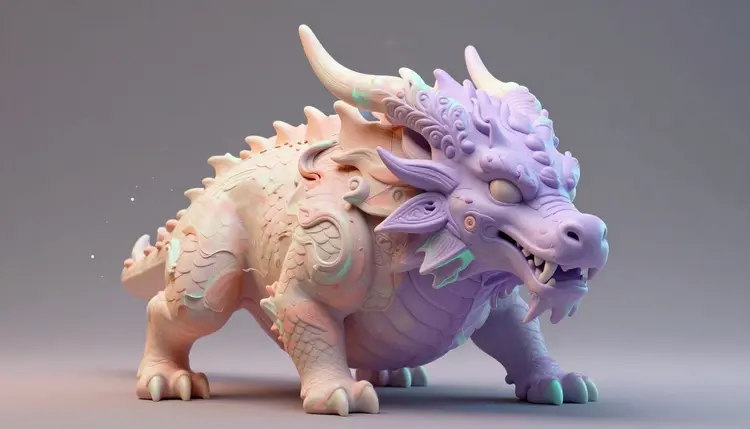
A concept artist's job starts with a blank page and a deadline that does not care how many directions are worth exploring. Before a frame gets greenlit for a game or a film, someone has to answer what the swamp temple looks like, in pictures, fast enough that a director can react to ten ideas instead of two. AI image generation earns its place here, not as a replacement for the artist who finishes the piece, but as the tool that turns a written brief into a wall of options before lunch.
Concept art has always been an exploration cost problem. A studio wants a dozen readings of a villain's throne room before committing an artist's week to painting one properly, and traditionally that exploration was the expensive part: thumbnail after thumbnail, each one a real time cost even at low fidelity. Text-to-image models change that economics. A director can describe a mood in a sentence and get several distinct visual answers back in the time it takes to read them.
Picasso IA runs 488 models behind one interface, including FLUX, Seedream and nano banana, so a single brief can be pushed through engines with different strengths without learning a new tool for each one; the full catalog is browsable if you want to see what else sits alongside them. New accounts start with free credits, enough to test whether a direction is worth pursuing before a single hour of painting goes into it. None of this replaces the concept artist. It replaces the version of the job where the first two days are spent guessing what the director meant.
The three subjects behave differently in a prompt, and treating them the same way is the fastest way to get generic results. An environment prompt reads like a location scout's notes: place, time of day, weather, scale, one dominant material. A creature prompt needs anatomy grounded in something recognizable before it diverges, since pure invention alone tends to drift toward familiar silhouettes. A prop prompt rewards specificity about material and wear: a name that means something, an era, a texture, a sign of use.
Camera and lighting language does more work here than most people expect, because it tells the model whether you want a moodboard frame or a hero turnaround. Terms like wide establishing shot, low camera angle, rim light from a single source, or orthographic front view steer composition as reliably as the subject itself. Running the same subject through two or three lighting setups is often faster than describing the final mood in one sentence.
Write the material before the color. Weathered bronze reads differently than painted bronze, and a model that knows the surface tends to get the light right without being told separately.
Iteration matters more than the first result. Generate four variants per prompt: a tight spread means the prompt is precise, a wild one means the brief needs another sentence of grounding. The effects page collects preset looks, a faster way to find style vocabulary than guessing at adjectives.
Different stages of a concept art pass call for different tools. A rough exploration round wants speed over polish; a hero shot wants resolution and detail; a locked design that needs one thing changed wants an editor that leaves everything else untouched.
| Model | Strengths | Best for |
|---|
| flux-pro | Fast, reliable prompt adherence | Rapid thumbnail exploration, first-pass directions |
| flux-1.1-pro-ultra | High resolution, crisp detail | Hero shots for a pitch deck or portfolio piece |
| seedream-4.5 | Up to 4K output, blends several references | Detailed environments and moodboards built from reference photos |
| nano-banana-2 | Conversational editing, holds identity across edits | Refining a chosen direction one instruction at a time |
| flux-kontext-pro | Targeted edits from a single reference image | Palette swaps or material changes on an already-approved design |
| ideogram-character | Holds one character across scenes from a reference | Hero character turnarounds and expression sheets |
None of these is universally best. Run a brief through two or three and keep whichever one understood it.
This workflow ends with an approved direction rather than a folder of near misses. It works the same way for a location, a creature or a prop, entirely inside the Picasso IA toolkit.
- Write a one-paragraph brief. Subject, mood, scale and one dominant material or color, the way you would brief a human artist starting cold. Vague briefs produce vague spreads.
- Generate a wide first pass. Run the same brief through flux-pro and seedream-4.5, four images each, keeping the wording fixed and only swapping camera or lighting terms between batches.
- Pick a direction, not a final image. Look for the composition or mood that is closest to right, even if the details are wrong. That direction becomes the anchor for every generation after this one.
- Refine with conversational edits. Feed the chosen image into nano-banana-2 and change one thing per instruction: move the light source, swap the material, adjust the silhouette.
- Lock the frame at full resolution. Once a version is approved, regenerate it at the highest resolution the model supports so it survives being blown up on a pitch deck or handed to the next department.
A single striking image is not a concept art package. Games and films need a consistent visual language across dozens of assets, and that consistency is not free; it has to be built deliberately, the same way an art director keeps a whole team on-model.
- Reference sheet first: generate or select one anchor image per environment, creature or prop family before branching into variations, the same discipline covered in consistent AI characters.
- Fixed identity block: write a short paragraph naming the invariant materials, palette and proportions, and paste it into every prompt for that asset family so later generations do not drift.
- One variable at a time: change lighting, or angle, or material, never all three in one generation, so it stays clear which change caused which result.
- Batch review, not one-off judgment: line up a family of renders side by side every few batches and reject the ones that quietly drifted before they get approved into the package.
- Name and version everything: a folder of files called final, final2, final-real solves nothing three weeks later when the art director asks which one shipped.
For teams building playable assets rather than pitch art, an approved concept frame can move into a 3D pipeline. Turning a 2D concept into a 3D model covers that handoff in detail, and studios comparing a multi-model catalog against a single subscription tool can read the Picasso IA vs Midjourney breakdown for where each approach tends to win.
An honest tool page says where the tool stops working. For production concept art there are real limits worth knowing before a deadline depends on them.
Mechanical and structural logic is the most common failure: hinges, gears and armor plating that look convincing at a glance often do not actually work if you trace how the pieces would move, so a design meant to be built needs an artist's pass for function, not just looks. Exact measurements and blueprint-grade accuracy are out of reach; a model renders an impression of scale, not a dimensioned drawing, so anything built to spec goes through a human draftsperson afterward. Continuous lighting or camera geometry is hard to hold across separate generations, since each image is generated independently. And a generic brief drifts toward familiar genre conventions, so a design meant to feel original needs specific, unusual details rather than a one-line description of a well-known archetype.
None of this is a reason to skip the tool for the job it is actually good at: getting a wide set of visual directions in front of a director fast, before committing real art hours to one of them.
Is AI concept art good enough to pitch to a studio or director?
As a direction-finding tool, yes; as a finished deliverable, it depends on the pitch. Many studios are comfortable with AI-assisted moodboards used to align a team before a human artist finishes the actual production art. Others have explicit policies against AI imagery in deliverables, so check with the studio or client before including generated frames in anything that leaves your machine as a final asset.
Which model should I use for a fantasy creature design?
Start with flux-pro or seedream-4.5 for the first wide pass, since both handle anatomy grounded in recognizable animals before pushing into invented territory. Once a silhouette reads right, move to nano-banana-2 for conversational edits like adding armor plating or changing the color pattern, and use ideogram-character if the creature needs to stay consistent across multiple scenes later in production.
Can I generate concept art from a rough sketch instead of only text?
Yes. Several models on Picasso IA accept a reference image alongside the prompt, including flux-kontext-pro and seedream-4.5, so you can upload a thumbnail sketch or a photo reference and ask the model to render it in a specific style or level of finish. This tends to preserve your composition more reliably than describing the same layout in words.
How do I keep an environment's mood consistent across many shots?
Write a short identity block naming the fixed elements, the dominant palette, the light direction and the material language, and paste it into every prompt for that location. Generate an anchor image first, then use it as a visual reference for follow-up shots where the model supports one, rather than starting each new angle from a blank prompt.
Does AI concept art replace a concept artist's job?
Not the finishing work. It replaces the slowest part of exploration, staring at a blank page guessing at directions, by producing a wide spread of options quickly. A working artist still selects, refines and finishes the winning direction, resolves the mechanical logic AI gets wrong, and adapts the design to the specific technical constraints of the production it is built for.
Can concept art made this way be turned into a 3D model for a game?
Yes, with a caveat. A concept frame gives a 3D artist a strong visual target, and image-to-3D tools can produce a rough mesh from a single clean image as a starting blockout. That mesh needs retopology and manual cleanup before it is production-ready for a game engine; treat the automated conversion as a fast first draft, not a finished asset.
What is the difference between using flux-pro and seedream-4.5 for concept work?
flux-pro tends to be faster and reads a prompt's composition and lighting closely, which suits quick exploration rounds. seedream-4.5 supports higher output resolution and blends several reference images at once, which suits detailed environment work or moodboards built from real location photography.
How much does generating concept art cost?
Generations are paid in credits, and the exact cost per image depends on the model and settings chosen, so a specific number here would be wrong within a few months as the catalog changes. Images generally sit at the cheaper end of the catalog compared to video generation. New accounts get free credits to test the workflow, and current plans live on the pricing page rather than being repeated here.
Can I use AI concept art commercially in a game or film production?
Generally yes, but the diligence is yours to do. Check the licensing terms attached to the models you generate with, confirm the studio or publisher accepts AI-assisted concept work, and review every image before it enters a production pipeline. Disclosure requirements vary by client, so ask rather than assume.
Why do my creature designs keep looking like the same three archetypes?
Generic prompts pull toward the most common patterns in a model's training data, which for creatures usually means a handful of familiar silhouettes. Ground the design in unusual reference points, an animal that is not the obvious choice, an unexpected proportion, a material nobody puts on that body part, and the results diverge much further from the default.
Your brief deserves a wider set of answers than the first idea that comes to mind. Open the Picasso IA toolkit and turn today's concept art brief into a full spread of directions before the meeting starts.