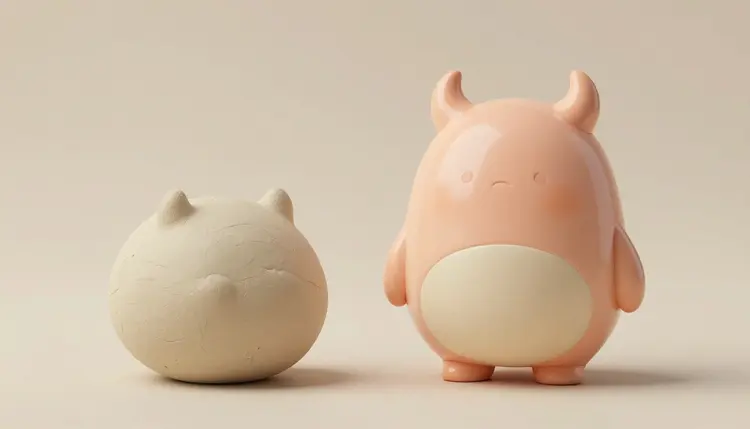
Every designer toy starts as a doodle: a round head, two odd horns, a face that looks mildly unimpressed. The hard part is not drawing it, it is knowing which of your twenty doodles deserves months of sculpting and a mold. AI image models let you see each one as a glossy vinyl figure in an afternoon, so the choice is made on a picture instead of a hunch.
Designer toys live and die on silhouette, proportion and finish. Those three things are visual, which is exactly what image models are fast at. A flat pencil sketch tells you little about how a character looks as a glossy, slightly soft object with a painted face and a studio highlight rolling over its head. A rendered concept tells you almost immediately.
There is also a cost curve at work. Physical prototyping is slow and every iteration costs real money, so most independent artists get two or three tries. A generated concept is cheap enough to throw away, which means you can explore thirty colorways, five body shapes and a handful of poses before you commit to any of them.
Picasso IA runs 502 models behind one interface, including FLUX, Seedream and nano banana for images, plus image-to-3D tools such as hunyuan-3d-3.1 and Rodin. New accounts get free credits to try a direction before spending anything, and the full catalog shows what else is available. Everything runs in the toolkit, so concept, edit and 3D draft happen in one place.
Once you have a character you like, resist the urge to polish it. Push it through different angles first and see which one surprises you. Each row below is a separate round of generations, run on the same base sketch.
| Angle | What you change | What you learn |
|---|
| Colorways | Palette words and paint finish: pastel, two-tone, metallic, translucent | Which version you would actually want on a shelf |
| Body proportions | Head to body ratio, limb length, chubby versus lanky | Whether the silhouette still reads in black and white |
| Materials | Glossy vinyl, matte vinyl, resin, soft rubber, plush | How the character feels, and what is realistic to produce |
| Turnaround | Front, side and back views on a plain background | Whether the design holds up from every direction |
| Packaging mockup | Window box, blind box tray, display plinth | How it looks in context, before any real packaging exists |
Keep the character fixed and change only one column per round. If you change the colors and the body at once, you will not know which change made the version better.
This is the path from a scrap of paper to a draft you can show a sculptor. It assumes a phone photo of a sketch and an hour.
- Photograph the sketch. Plain paper, even light, the whole character in frame. A rough line drawing is enough, since the model reads shape and proportion rather than neat linework.
- Render it as a vinyl toy. In the toolkit, pick an image editing model such as nano banana or qwen-image-edit, attach the photo and ask for the same character as a glossy vinyl designer toy, studio light, plain backdrop.
- Run colorways and views. Keep the attached reference and change one thing per round: palette, finish, or a front, side and back set. Stack the results and cut everything you would not buy.
- Generate a text-to-image variant for contrast. Use FLUX or Seedream from a written description of the same character. If the model invents something better than your sketch, steal it.
- Build a rough 3D draft. Feed the winning single view to hunyuan-3d-3.1 or Rodin, rotate the mesh, and note where the shape falls apart. That list is your brief for the sculptor.
The word toy alone gets you a generic plastic figure. The details that make an image read as designer vinyl are specific, and models respond well to them when you name them plainly.
Start with the material: glossy vinyl, soft rounded edges, slightly visible mold seam, a painted face with simple dot eyes. Add the stage: macro product photograph, soft studio light, plain paper backdrop, shallow depth of field. Then state the proportions in words, such as an oversized head, short stubby limbs and a small body, because models drift toward realistic anatomy unless you tell them not to.
Faces matter more than you would expect. Designer toys usually have minimal faces, two dots and a line, and the model will happily over-detail them. Ask for a simple painted face and a calm expression. If you want matching pieces in one series, keep one successful render as an attached reference and vary the character description around it, the same trick used for consistent AI characters.
Tip: generate the figure against a plain light backdrop with nothing else in the frame. Image-to-3D tools do far better with a single object on a simple background, and the same picture also doubles as a clean thumbnail for your portfolio.
A turnaround image is useful, but a mesh you can spin tells you more. The two image-to-3D models in the catalog work differently enough that it is worth trying both on the same picture.
hunyuan-3d-3.1 takes either a single image or a text description, not both at once. It has a Normal mode that returns a textured model and a Geometry mode that returns a plain white mesh, plus a PBR material option and a face count setting. Its own guidance asks for one object, a simple background and the object filling more than half the frame, which is exactly what a toy render on a plain backdrop gives it. Rodin accepts up to five reference images, so a front, side and back set can inform the shape, and it exports to GLB, FBX, OBJ, USDZ and STL with quality tiers and a seed for repeating a result.
Treat the output as a three dimensional sketch. Spin it, look at the back, look at the underside and check whether the stance would actually balance on a shelf. Often the mesh shows you that an elegant concept has a floating horn or a leg that cannot carry the body. For the general method, the image to 3D model page goes through the workflow, and if your end goal is a physical print, read AI 3D models for 3D printing before you trust a mesh with a printer.
A concept is not a product. Here is where the pipeline stops being useful and a person with real skills has to take over.
- Manufacturing: a generated mesh is not a production sculpt. Vinyl toys are made from sculpts with clean parting lines, wall thickness and mold logic, and that work needs a real sculptor and a factory that will tell you what is feasible.
- Back and underside: image-to-3D tools guess whatever the picture does not show, so the rear of the figure and the base are the most likely places for melted shapes and missing detail.
- Painted details: tiny faces, patterns and logos on a render are suggestions. Real paint applications have limits, and what looks crisp in an image may need to be simplified for a production run.
- Series consistency: keeping ten characters in one visual family takes constant editing and a good reference image, and models will still drift in proportions between pieces.
- Originality: models learn from existing toys, so a generic prompt lands on familiar shapes. Strong results come from your own sketch, which carries a point of view the model cannot invent.
None of this makes the concept stage less valuable. It just means the draft is where the money starts, not where it ends.
Can AI design a vinyl art toy from a simple sketch?
It can turn a rough sketch into a convincing render of that character as a glossy vinyl figure. You attach a photo of the drawing to an image editing model such as nano banana or qwen-image-edit, describe the material and the lighting, and the model keeps your shapes while adding the finish. It will not produce a manufacturable sculpt, only a concept that shows you how the idea looks as a finished object.
Which AI models work best for designer toy concepts?
There is no single best, which is the argument for a catalog. Editing models like nano banana are good at keeping your sketch faithful, FLUX and Seedream are good at producing fresh variations from a written description, and hunyuan-3d-3.1 and Rodin handle the step from image to a rough 3D mesh. A sensible session runs the same idea through two or three of the 502 models and keeps whichever read the brief best.
Can I turn the concept into a 3D model?
Yes, as a draft. hunyuan-3d-3.1 builds a mesh from a single image or a text description, and Rodin can use up to five reference images and export in several formats. Both are useful for checking proportions and spinning the figure around. Neither replaces a sculptor, since the result is a guess at the parts the picture never showed, and it is not set up for molding.
Can I make a physical toy straight from the AI output?
Not directly. Production vinyl needs a purpose-built sculpt with parting lines, sensible wall thickness and a stance that stands up on its own. The AI output is the reference that makes that conversation faster: show the sculptor the concept, the turnaround and the rough mesh, and they can tell you what to simplify. A 3D print of a draft mesh can work as a personal desk piece, not as a mass produced toy.
How do I keep one character consistent across colorways and poses?
Hold on to one render you like and attach it as a reference every time you generate. Change only the part you are exploring, such as the palette or the pose, and say that everything else stays the same. When the character starts drifting, go back to the original render rather than the latest variation. The same habit appears in the AI character consistency workflow.
Do I need to draw well to start?
No. The sketch only has to carry shape and proportion, so a clumsy outline of a round head and two horns is enough. If you cannot draw at all, start from a written description in a text-to-image model, pick the best result and iterate from there. What matters more than drawing skill is a clear idea of what makes your character different from the thousand others.
Can I sell toys based on AI generated concepts?
Rules differ by country, and the law around machine-generated images is still settling, so check the requirements that apply to you before you sell anything. Practically, the safest route is to treat the AI render as inspiration and have a sculptor produce an original sculpt. Also avoid prompting with names of existing toy brands or characters, since your design should stand on its own.
Can I use AI to design the packaging as well?
For mockups, yes. Ask an image model for the figure inside a window box or on a display plinth, or place your toy render into a scene using an editing model. That shows how the figure sits next to its box and helps you pick colors. For the real packaging you will still need a dedicated layout with accurate dimensions from your manufacturer, and the platform where you sell may have its own image rules, so check them.
Why does my toy render look like generic plastic?
Usually the prompt is too short. Name the finish (glossy vinyl, soft rounded edges), the stage (macro product photograph, soft studio light, plain backdrop) and the proportions (oversized head, tiny limbs), then ask for a simple painted face. Without those details a model falls back on an average toy look. Attaching your own sketch also helps, because it brings a silhouette the model has not seen a thousand times.
How much does this cost?
Generations are paid in credits, and the cost depends on the model and the settings you choose. Images sit at the cheap end of the catalog, while 3D generations tend to cost more per run. New accounts start with free credits, which is enough to test a character through a few rounds. Current plan details live on the pricing page, which is the only place worth trusting for numbers.
Ready to see what your doodle looks like as a shelf piece? Open the Picasso IA toolkit and render your first vinyl concept today.