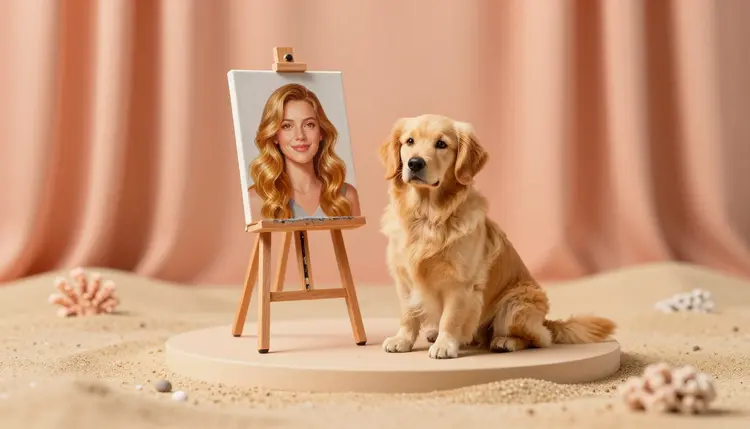
Everyone with a dog or a cat has wondered the same thing: if this animal were a person, who would they be? The ginger hair, the suspicious squint, the head tilt at the sound of a snack bag. Image editing models can now answer from a single photo of your pet, translating coat, eyes and expression into a human portrait, and they can run the trick in reverse for you.
People already describe their animals in human terms. The dog is the cheerful one who knows everyone, the cat is a retired judge with strong opinions about breakfast. A human portrait simply puts a face on that description, which is why these images get shared: they are funny, and they are a little too accurate to be a coincidence.
The practical uses are small and warm. A birthday card for the pet's owner, a profile picture that is not another selfie, a character for a children's story starring the family dog, a gift for the friend who talks about their cat more than their job. Because the result is a fictional person built from an animal, there is nobody to ask permission from and nothing to misrepresent, as long as you keep it to your own pets and your own face.
Picasso IA runs 502 models behind one interface, and the ones that matter here are the image editors, the models that take your photo plus a written instruction and hand back a changed picture. New accounts get free credits, so you can find out whether your pet translates well before spending anything, and the full catalog is open if you want to see what else is in there.
The model is not scanning your pet and building a person from the measurements. It reads the photo as a set of traits and then writes a human who plausibly carries them. A ginger tabby becomes ginger hair. A white patch on the chest turns into a pale streak, a collar or a scarf. Amber eyes stay amber. A tilted head and half-closed lids become a tilted head and a half-lidded stare, which is often the part that makes people laugh.
That is why the wording of your instruction matters more than usual. If you only say turn this cat into a human, you get a generic person who happens to be vaguely orange. If you name the traits you want carried over, hair color from the coat, eye color as it is, the same mood, you get a portrait that still reads as your animal.
There are two routes. The first is photo plus instruction, where you attach a picture of your pet to an editing model such as nano banana, qwen-image-edit or flux-kontext-pro and describe the person you want. The second is text only: you write the whole character from scratch, which works for an imagined pet or one you have no good photo of. For a pet you actually own, the photo route is usually closer, because the details come from the picture and not from your memory of it.
The reverse also works. Attach a photo of yourself and ask for the cat or dog version: a character with your hair color as a coat, your glasses, your usual expression. It is a cartoon-style animal portrait, not a reading of your face, and it should be your own photo only. For painted and illustrated pet art that starts from the animal itself, see AI pet portraits.
Which route to take depends on what you have in hand and what you want out of it. This is the short version.
| Approach | Best for | What you give the model | What to watch |
|---|
| Photo plus instruction in nano banana | The closest match to your real pet | One clear pet photo and a sentence naming the traits to carry over | A vague instruction drifts toward a generic person |
| Step-by-step edits in qwen-image-edit or flux-kontext-pro | Fixing one thing at a time: hair, outfit, background | The first result and a one-line change | Many edits in a row can slowly wander from the original look |
| Text-only description | An imagined pet, or no usable photo | Coat colors, personality and outfit written out | Looks generic unless every detail is specific |
| You as a pet (reverse) | A cat or dog version of yourself | Your own photo and the traits to keep | Only your own face, and it stays a cartoon-style character |
| Pet and owner together | A side-by-side or family portrait | Both photos, since nano banana accepts several reference images | The pet's likeness can get lost in a shared frame |
Whichever you pick, run it more than once. A single result tells you very little about a model, and the second and third usually show whether the idea is working or the instruction needs another sentence.
Here is the workflow on Picasso IA, from a camera roll photo to a portrait you would actually show a friend.
- Pick a clear photo of your own pet. Face toward the camera, good light, eyes visible, and no other animals or people in the frame, so the model reads a single subject.
- Open the toolkit and choose an image editor. In the toolkit, start with nano banana, attach the photo and write your request in a plain sentence.
- Describe the translation, not just the result. Say which traits carry over (coat color as hair, markings as streaks, eye color, mood) and set the frame, for example a studio portrait from the shoulders up.
- Compare a few runs and a second model. Generate again, then try qwen-image-edit or flux-kontext-pro with the same photo and keep the version that still feels like your animal.
- Refine one detail at a time. Feed the winner back in and change a single thing: hair length, clothing, expression. Run the final image through an upscaling model from the catalog if you plan to print it.
The best prompts read like a casting call. Instead of a human version of my dog, try something like: an adult woman in a studio portrait, wavy golden hair matching the dog's coat, warm brown eyes, a relaxed open smile, same head tilt as the dog in the photo, soft window light. Every clause is a trait you can check against the original photo, and when the result misses, you know which clause to rewrite.
Tip: borrow one odd detail from your pet and say it out loud in the prompt, the crooked ear, the single white sock, the permanent frown. The generic traits are what every model gets right, and the odd one is what makes you say that is exactly him.
Three mistakes show up again and again. The first is piling twelve instructions into one prompt, which makes the model average them all and satisfy none. The second is using a blurry or dark photo, since the model can only translate what it can see. The third is asking for exact resemblance to a person you know: results are fictional characters, so keep the request to traits and styles, never to a named individual.
Once you have a portrait you like, the style is easy to change. Ask for an oil painting, a cartoon or a soft animated look, and browse the effects page for preset looks that need no prompt at all. If the style you want is a cartoon, turn photos into cartoons covers that route in more depth.
This is a fun use of the tool, and it has real edges. Five of them come up often enough to plan around:
- Fictional only: the result is an invented person assembled from your pet's traits, so do not expect, ask for or share it as a likeness of any real individual, and do not upload other people's photos to make look-alikes.
- Complex coats: calico, brindle and merle patterns get simplified, so a mosaic of patches may turn into plain streaks or one dominant hair color.
- Little to translate: a hairless cat or a flat-faced breed gives the model less to carry over, so the portrait leans almost entirely on eye color and expression.
- Groups get merged: two pets in one photo often collapse into one person or two near-twins, so portrait each animal separately.
- No built-in memory: every generation is a fresh interpretation, so keeping the same person across several pictures means feeding the first result back as a reference, the same idea as consistent AI characters.
None of this ruins the fun. It means you should treat each result as a charming interpretation of your pet, not a scientific translation, and keep the hands and background simple so nothing distracts from the face.
Can AI turn my dog or cat into a human?
Yes, in the sense of a fictional human portrait that borrows your pet's coat color, eye color, mood and pose. You upload a photo to an image editing model, describe the kind of person you want, and it generates one. It is an interpretation rather than a literal conversion, because an animal face cannot be mapped onto a human one, so the quality of your instruction decides how recognizable your pet is in the result.
Which AI model is best for turning a pet into a person?
There is no single winner, which is why trying more than one helps. Nano banana is a good first stop because it takes a photo and a plain sentence and can accept several reference images. Qwen-image-edit and flux-kontext-pro are strong for editing one thing at a time. Run the same photo and instruction through two of them and keep the portrait that still feels like your animal.
Can I do the reverse and see myself as a dog or cat?
Yes. Attach a photo of yourself, ask for a cat or dog character that keeps a few of your traits, such as hair color as a coat, your glasses or your usual expression, and generate. The result is a stylized animal portrait, closer to a mascot than a mirror. Use only your own photo for this, and keep the request to a fictional animal character.
Will the human version look like my actual pet?
It will look like your pet in spirit: the coloring, the eyes, the mood. It will not look like a person who secretly is your pet, because there is no real mapping between an animal face and a human face. The more specific traits you name, the more recognizable the result. Naming one distinctive detail, like a crooked ear or a white sock, helps more than adding adjectives.
Can I make my pet look like a celebrity or a real person?
No, and the page is built around not doing that. Portraits here are fictional characters built from your pet's traits. Asking for the look of a named, real person raises likeness and consent problems, and models can also get it wrong in unflattering ways. Describe hair, age, clothing and mood instead, and you will get a character that belongs to you and nobody else.
Is there a free way to try AI pet to human portraits?
New Picasso IA accounts get free credits, and a single image edit costs far less than video or 3D work, so you can test a few photos and models before paying anything. How far the free credits go depends on the model and settings you choose. Plan details are listed on the pricing page, which is the only place to trust for current numbers.
What kind of pet photo works best?
A sharp photo in even daylight, with the face turned toward the camera and the eyes visible. Keep one animal in the frame and avoid heavy filters, since the model translates what it can see. Side views and sleeping pets still work, but you give up expression, which is usually what carries the personality into the human version.
Can I include several pets or a whole family in one portrait?
You can try, with lower expectations. When two animals share a photo, models often merge them into one person or produce two near-identical people. A more reliable way is to make one portrait per pet, then ask an editor that accepts several images to combine the results into a group scene, checking each face before you keep it.
Can I print the portrait or put it on a mug?
For a personal gift, a framed print or a mug with your own pet's portrait is a natural use. Run the final image through an upscaler first so it holds up at print size, and look at the sample from your print service before ordering a batch. If you plan to sell products, check your print platform's current rules on AI-generated artwork first.
How much does generating these portraits cost?
Generations are paid in credits, and the cost per image depends on the model and the settings you choose, so any number written here would go stale. Image edits sit at the cheaper end of the catalog compared with video or 3D. New accounts start with free credits, and current plan details live on the pricing page.
Your pet has been giving you a look for years, and now you can find out who is behind it. Open the Picasso IA toolkit, attach a favorite photo and see who they turn out to be.