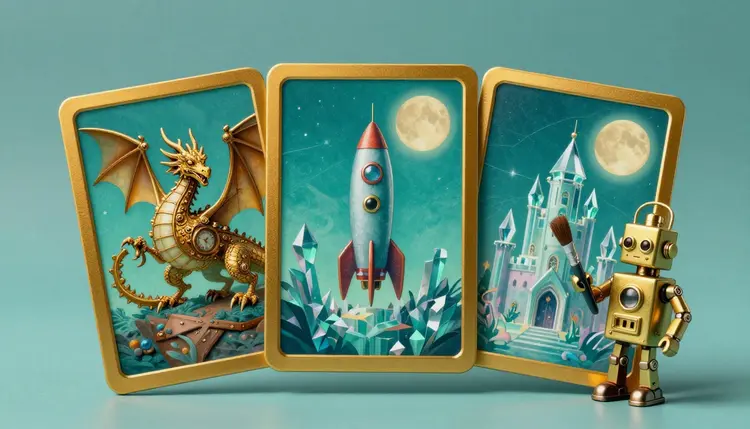
A card game lives or dies on its art. Every card needs an illustration, the set needs to look like it came from one hand, and a few dozen commissions is more than most hobby projects can fund. AI image models cover the first draft of that problem: you describe a creature or a place, get options in the time it takes to make tea, and keep what fits your world.
A trading card is a small stage. One character, one mood, one clear silhouette, framed by a border you design. That is a tight brief, and tight briefs are where text-to-image models do well. You are asking for a portrait of a clockwork fox or a ruined lighthouse, not a sprawling scene.
The practical gain is iteration. A designer prototyping a game usually does not know yet which cards will survive playtesting. Paying for finished illustrations of cards that get cut is painful, while generating a placeholder, testing the rules with friends and replacing weak cards is cheap. If the game takes off, you can still hire an illustrator for the cards that matter most.
Picasso IA puts 502 models behind one workspace, 212 of them text-to-image, including FLUX 2, Seedream, Nano Banana Pro and GPT Image. Engines differ in line, color and texture, so you can try one card description on two or three and keep the look you prefer. The full catalog is open to browse, and new accounts get free credits to test a direction before spending anything.
One rule shapes everything below: this page is about original cards. Invent your own creatures, factions and heroes. Do not ask for an existing game character, a film franchise or a living artist's signature style, and do not use a real person's face for a card. A deck built on borrowed characters is also a deck you cannot sell.
The hardest part of card art is not the first card, it is the fortieth. A set only reads as a set when the line weight, palette, lighting and level of detail match from card to card. Models do not remember your last image, so consistency is something you build into your process.
Start with a style paragraph and treat it as a fixed block. Write it once: the medium (gouache, ink and watercolor, 3D clay, pixel art), the palette, the lighting, the framing, the background treatment. Then paste it unchanged after the subject on every card. Only the subject sentence changes. If a card drifts, the first thing to check is whether the style block was altered.
The second tool is reference images. Models such as Nano Banana Pro accept up to 14 reference images alongside the prompt, so you can attach two or three of your best cards and ask for a new subject in the same look. The same idea powers consistent AI characters, and it carries over to creatures and locations just as well.
Treat your first three approved cards as the style bible. Every later card gets those three as reference images and the same style paragraph. When a new card looks off, compare it against the bible, not against your memory of what you wanted.
Reference images and a fixed prompt narrow the spread a lot, but they do not make it zero, so plan to regenerate a few cards.
There is no single right way to make a deck. These are the routes people actually take, and they combine well.
| Approach | What you do | Works well for | Watch out for |
|---|
| One style block plus subjects | Paste the same style paragraph with a new subject each time | Whole sets of creatures, spells and locations | Slow drift if you edit the style words mid-project |
| Reference images | Attach approved cards and ask for a new subject | Keeping line and color matched across a faction | Models copy composition too, so cards can start to look alike |
| Frame and art separately | Generate full-bleed art, build the border and text boxes in a layout tool | Games with a strict card template | You must leave empty space where the frame will cover the art |
| Edit an existing card | Change one detail with an image editing model | Fixing a hand, swapping a prop, recoloring a faction | Repeated edits can soften detail, so keep the original |
| Hybrid with a human artist | AI for placeholders and mood, an illustrator for key cards | Games heading to a real print run | Briefing the artist from your AI images needs clear ownership terms |
Most people use the first two rows for the bulk of the deck and the third to keep the layout under control. If you like to compare engines before committing, the Picasso IA vs Midjourney breakdown explains how a catalog differs from a single-model tool.
This is a path from a blank page to a folder of cards you can playtest.
- Write your style block and a world note. Pick the medium, palette, lighting and framing, then add two lines about the world so the subjects belong together. Save it as a text file you will paste every time.
- Test the block on three engines. Open the toolkit, pick a text-to-image model such as FLUX 2 Pro, Seedream 4.5 or Nano Banana Pro, and run the same subject through each. Keep the one whose line and color you like.
- Generate the cards in batches by type. Do all creatures, then all spells, then all places, so each batch shares a mood. Ask for a portrait or a near-vertical ratio, since the models offer 2:3 and 3:4, and leave space around the subject for the frame.
- Fix and match with references. Attach your three best cards to a model that takes reference images and re-run the cards that drifted. Use an editing pass for small fixes such as a hand or a prop, and keep the unedited original.
- Upscale and prepare for print. Run the finals through an upscaler such as Real-ESRGAN, then crop and extend to your printer's template. Export the art without the frame if you build the layout elsewhere.
Still defining your world? The concept art page helps, and so does D&D character art for hero portraits.
A card that looks perfect on your monitor can come back from the printer with the border sliced off one edge or the subject's face trimmed away, and that is almost always a template problem, not an art problem.
Do not trust any number you read in an article, including here. Every printer publishes its own card dimensions, bleed margin, safe zone, resolution target and file format, and they differ between companies and between card stocks. Download the template from the printer you plan to use and build the card to that, before you generate anything final.
Two habits prevent most disasters. First, generate the art a little larger than the visible window, so the bleed area has real picture in it instead of a stretched edge. Image models give you a few fixed ratios rather than exact card proportions, so you will crop or extend, and an image expander is the clean way to add the extra margin. Second, keep faces, hands and important details well inside the safe zone, because trimming varies from sheet to sheet.
Order a small proof before a full run. Print one sheet of different cards and check the color, the fine lines and whether the text boxes cover the best part of the picture. The photo upscaler page explains what upscaling can and cannot rescue.
Be clear about the limits before you plan a print run around it.
- Text on the card: models can garble letters, so generate the art without any words and add the name, cost and rules text in a layout tool where you control the font.
- Exact consistency: the same character in a new pose will not be a perfect match every time, which matters for a hero who appears on many cards, so budget regeneration time.
- Hands, weapons and anatomy: a card with a sword and two hands is where models slip, and a flaw you can ignore on a phone becomes obvious at card size.
- Rules clarity: art cannot tell a player what a card does, so icons and frames for costs, types and rarity still need to be designed by you and kept readable.
- Ownership and market rules: copyright for generated images varies by country, and some stores and print services have their own policies on AI art, so read the current terms of each before you sell.
None of these stops a playtest deck. They matter most when money is involved, and that is when a human illustrator earns their fee on the cards the set is judged by.
Can I use AI art for a card game I plan to sell?
It depends on where you live and where you sell. Copyright protection for machine-generated images is limited or unsettled in several countries, and some marketplaces and print services publish their own rules on AI content. Check the current terms of your platform and printer, and consider a lawyer before a commercial run.
How do I keep the same style across every card?
Write a fixed style paragraph covering the medium, palette, lighting and framing, and paste it unchanged after each new subject. Then attach your best approved cards as reference images on models that accept them, such as Nano Banana Pro. This narrows the variation a lot, but it does not remove it, so plan to regenerate the occasional card that drifts.
Which AI model is best for trading card art?
There is no single best, which is the argument for a catalog. FLUX 2 Pro, Seedream 4.5 and Nano Banana Pro are good places to start, and GPT Image 1.5 and Recraft V4 are worth a test if you want a different look. Run one card through two or three and keep the engine whose line and color match your game.
What size should the card images be?
Check your printer, because every company publishes its own template with exact card dimensions, bleed and safe zone. Generate the art slightly larger than the visible card window so the bleed contains real picture, then crop or extend to the template. The models offer set ratios such as 2:3 and 3:4, so expect a crop step, and upscale the finals if the file is small.
Can I make cards of existing characters or a franchise I love?
No, and it is not a good idea even for a private deck you intend to share. Characters, worlds and distinctive designs belong to their owners. Invent your own creatures, factions and heroes, describe them in your own words, and avoid real people's faces, so the deck stays yours to use and sell.
Can the AI put the card name and rules text on the card?
You should not rely on it. Image models still garble letters often enough that a rules card with a typo is a real risk. Generate the illustration with no text, then build the frame, name, cost and rules in a layout tool. That also lets you change a rule later without regenerating the art.
How do I keep one hero consistent across many cards?
Pick one approved image of the hero and attach it as a reference every time, with the same description of their clothes and colors in the prompt. Change only the pose, the setting or the action. The consistent characters page walks through the technique. Keep the details that identify the hero simple.
Do I need to remove the background from card art?
Usually not, since most card art is full-bleed with the background as part of the picture. You would want it when a creature pops out of the frame or when you layer characters over a shared background. A background removal model in the toolkit does the cut, and the background removal page explains how to check the edges.
How many cards can I generate before it gets expensive?
Generations are paid in credits, and the cost per image depends on the model and the settings you choose, so any number written here would be wrong within a month. Images sit at the cheap end of the catalog compared to video or 3D. New accounts get free credits to start, and the pricing page is the place to look for current numbers.
Should I use AI art for the whole deck or just part of it?
Either works, and the choice is about risk. For a prototype or a game among friends, using AI for all of it is practical. For a print run you will sell, many designers keep AI for secondary cards, placeholders and mood boards, and commission human work for the hero cards, the box art and the cards that define the set.
Ready to see your first card? Open the Picasso IA toolkit, paste your style block and generate the first creature of your deck today.