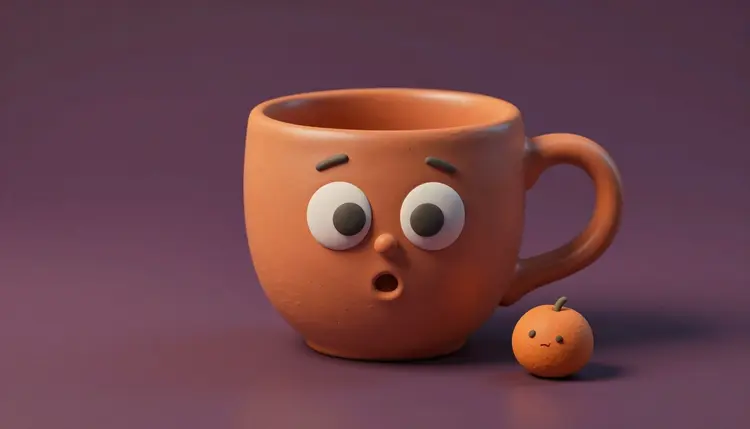
A coffee mug that complains about Mondays, an avocado that explains its own ripeness, a mascot that introduces the brand: talking objects are one of the oldest tricks in advertising, and they used to need an animation studio. Now you can generate the character, record or synthesize a voice, and sync a face to it in an afternoon. Fair warning: objects are harder than people, and this page says where.
A talking object does a job a human presenter often cannot. It is memorable for the dumb, good reason that nobody expects a stapler to have opinions. It also removes the awkward part of explainer content: no on-camera person to schedule and no studio. The character is the one thing in the video, so the viewer's attention goes to the idea.
It suits a narrow set of jobs well. A product can introduce itself in the first person, which turns a spec list into a joke. A food brand can let the ingredient make the pitch. A small business can give the shop mascot a standing role in every post. The common thread is a short line, a clear personality and a viewer who is happy to be amused for a few seconds.
On Picasso IA the whole chain lives in one place: image models for the character, text-to-speech for the voice, and avatar or lipsync models for the mouth, all inside the toolkit. New accounts get free credits, so you can find out whether your particular mug can talk before you spend anything.
There is no single model that makes objects talk. There are four routes, and each trades control against how reliable the mouth is. The catalog has 12 lipsync models, 24 text-to-speech models and 121 text-to-video models, so the question is less what exists and more which route fits the character you drew.
| Route | Models to start with | Best for | Watch out for |
|---|
| Photo plus audio | kling-avatar-v2, fabric-1.0, omni-human-1.5 | A single character image that speaks a recorded line | Mouth movement on non-human faces varies a lot between characters |
| Lipsync on an existing clip | lipsync-2, lipsync-2-pro | A clip you already animated, where only the mouth needs to match new audio | Built around human faces, so test on your object before you plan around it |
| Image to video, then voice-over | wan-2.6-i2v | Characters that move and react while a voice plays over them | The mouth is not tied to the words, so it works best when the voice is off screen |
| Cutaways around a still | Any image model plus b-roll | Longer scripts where the face only needs to move now and then | More editing, less face time |
Start with the first route, because it needs the fewest pieces: one image, one audio file, one generation. Kling Avatar v2 lists cartoon characters, animals and stylized art among the things it accepts, which makes it the obvious first test for a mug. Fabric 1.0 and Omni Human 1.5 take the same two inputs, and Omni Human 1.5 asks for audio under 35 seconds. Run the same character through two of them and keep the better mouth. The lipsync collection lists the rest.
This is the shortest path from an idea to a finished clip. It assumes a script of a few sentences, not a monologue.
- Generate the character with a clear face. Use an image model such as nano-banana-2 or seedream-5-pro. Ask for one object, facing the camera, with large eyes and a mouth that is visible and slightly open, on a plain background.
- Write the line and make the voice. Keep it to a few sentences in the object's own voice. Generate the audio with a text-to-speech model such as elevenlabs v3 or speech-2.8-hd, and pick a voice that matches the personality, not the object.
- Animate the face with an avatar model. Open kling-avatar-v2, fabric-1.0 or omni-human-1.5, attach the image and the audio, and add a short prompt for mood and gesture. Generate once and watch it with the sound on.
- Fix the weak takes. If the mouth barely moves, regenerate with a different model, a bigger and more cartoonish mouth in the source image, or a shorter line. Do not try to rescue a bad take with a longer prompt.
- Trim and add context. Cut the clip around the best moments, drop in b-roll or product shots between lines, and add background music at a low level.
The animation idea is the one behind AI talking photos, applied to something with no nose.
Most failed talking objects fail at the image stage, before any animation starts. A lipsync model needs something it can read as a mouth. A mug with two painted dots and no mouth gives it nothing to animate, so it either leaves the face still or invents a mouth that wobbles across the surface. Draw the mouth on purpose.
A few rules hold across nearly every character. Put the face on the front of the object and keep it large in the frame. Give it a visible upper and lower lip line, or an open mouth with a dark interior. Avoid decorative patterns around the face that look like mouths, such as a handle curve or a leaf.
Tip: generate the character image with the mouth already slightly open, in the same shape a cartoon character would use mid-word. Avatar models start from your still, and a mouth that begins open gives them a shape to open and close instead of one to invent.
Style matters as much as anatomy. A cartoon, clay or toy-like character reads as a character, and viewers forgive stiff movement because they expect it. A photoreal fruit with a human mouth lands in an uncomfortable middle, where every small error looks wrong. If you want the same character in many videos, lock one reference image and reuse it, the approach explained in consistent AI characters.
The format rewards short, specific, slightly absurd writing. The object should know exactly one thing about its own life and say it with confidence. A mug knows it is held in the morning and set down forgotten at three. A banana knows it is brown in an hour. That small self-knowledge is the joke and the product message in one line.
Write for the ear, in short sentences, and say each one aloud before you generate. Long clauses make the voice run out of breath and give the mouth model more words to get wrong. If a point needs more explaining, split it across two clips instead of one long take. The same idea carries into AI explainer videos, where a character is a way to hold attention while a point lands.
Brand use needs a little care. A mascot you own, or a fictional character you invented, is fine. A character that looks like another company's product or a famous cartoon is not a good idea. If the object stands in for something you sell, the picture must still be honest about the item, so do not give a talking mug features the real mug does not have. If a platform has rules about AI content or ads, check its current requirements before you post.
Lip sync was built around human faces, and objects are where that shows. Be ready for these:
- Inconsistent mouths: the same model can move one character's mouth well and leave another's almost still, so test every new character before you plan a series around it.
- Faces that drift: on longer clips an object's eyes and surface texture can shift between frames, which a human face tolerates better than a printed ceramic one.
- Short usable length: the models are built for short clips, and some set hard limits on the audio, so a long script has to become several clips that you cut together.
- Flat acting: you control mood with a prompt, not a direction, and the character can look more like it is chewing than laughing or sighing.
- Voice and character mismatch: a text-to-speech voice has human breaths and pauses, and when those do not line up with the mouth the clip feels off even when each part is good.
None of this makes the idea unusable. It makes it a short-form format, best at one joke, one tip or one introduction, and weak at anything that depends on subtle performance.
Can AI make an object talk?
Yes, within limits. The usual route is to generate an image of the object with a face, create a voice track with a text-to-speech model, and feed both into an avatar or lipsync model that animates the mouth. The result works best for short lines and cartoon-style characters. Realistic objects with human mouths are less predictable, and you should expect to regenerate a few times before you get a take you like.
Which models work best for talking object videos?
Start with the avatar-style models that take one image and one audio file: kling-avatar-v2, fabric-1.0 and omni-human-1.5. Kling Avatar v2 explicitly lists cartoon characters, animals and stylized art among its supported inputs, so it is a sensible first test. For the character image, nano-banana-2 and seedream-5-pro are good starting points, and for the voice, elevenlabs v3 and speech-2.8-hd. Try two models on the same character.
Do lipsync models work on non-human faces?
Sometimes. Avatar models such as kling-avatar-v2 describe support for characters and animals, while models like lipsync-2 and omni-human-1.5 are described mostly around human faces, with omni-human-1.5 also naming illustrated characters. The honest answer is that results depend on the individual character. A clearly drawn face with an obvious mouth works far more often than a subtle one, so test one clip before you commit to a series.
How do I give a mug or a fruit a voice?
Write the line first, then generate it with a text-to-speech model in the toolkit. Pick a voice that suits the personality: a gravelly, tired voice for a mug, a bright one for a lemon. Keep the line to a few sentences, then download the audio and attach it to the avatar model next to the character image. You can also record your own voice and use that file instead, which often sounds more natural than a synthetic voice.
How long can a talking object video be?
It depends on the model, and the limits are real. Omni Human 1.5 asks for audio under 35 seconds, and Kling Avatar v2 accepts audio files up to 5MB. Other models have their own rules, so check the settings of the model you pick. For a longer script, split it into several short clips and cut them together, switching to a different angle or a product shot between lines.
Can I keep the same mascot across several videos?
Yes, if you reuse the same source image. Generate the character once, pick the version you like and use that file as the starting still every time. Changing the prompt for a new image creates a slightly different character each time. If you need the mascot in new poses or scenes, use an image editing model with the original attached as a reference so the design stays recognizable.
Why does the mouth barely move on my object?
Usually the source image gives the model nothing to read as a mouth, or the face is too small or too stylized. Regenerate the image with a larger, clearly drawn mouth, ideally slightly open, and a plain background. If that still fails, try a different avatar model, since each reads faces differently.
Can I use my brand mascot or logo character?
If you own it, yes, and it is one of the most natural uses of the format. Upload the mascot image as the starting still, then add your audio. Make sure the character is yours or fictional: do not use another company's character or a real person's likeness. If the clip is an ad, check the current requirements of the platform where you will publish it.
Can I use a real person's voice for the object?
Only your own voice, or a voice you have clear permission to use. Recording yourself and attaching that file is the simplest and safest way to get a human feel. Do not copy a celebrity, a colleague or anyone else without their consent, and do not use an object to put words in a real person's mouth. A synthetic voice from a text-to-speech model avoids the issue entirely.
How much does it cost to make a talking object video?
Generations are paid in credits, and the cost depends on the model and the settings you choose, so a number written here would go out of date. A talking object video involves a few steps, an image, a voice track and an animation, and the animation step is usually the largest. New accounts start with free credits, and the pricing page has the current plans.
Pick one object on your desk and give it a line. Open the Picasso IA toolkit, generate the face first, and see whether it can say hello.